

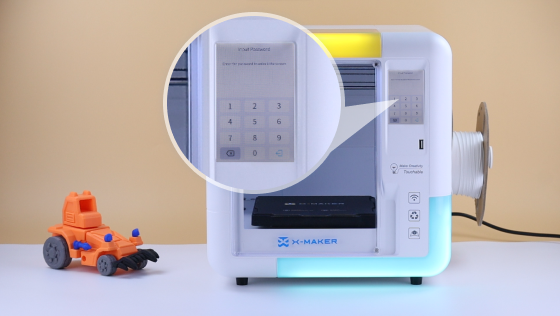
Child Lock
This video is a guide to set up and use the child lock on your 3D printer. This feature prevents children or other unauthorized individuals from accidentally operating the screen and potentially affecting your prints.
Simply go to Setting-Control-Child Lock-Input 4 digit password.
Watch the video below. You’ll find it out!






Further reading

Christmas Gifts for 8 Year Olds (2026): 15 Picks by Interest
Eight is when many kids level up. The AAP notes that 8 year olds start using logic and reason in new ways each day, so they can follow a long manual, fix their own mistakes, and finish a project wi...

Christmas Gifts for 7 Year Olds (2026): 15 Picks for Girls and Boys
Seven year olds can read a page of instructions, follow 20 or 30 steps, and finish a project without calling you over every two minutes, so the best gifts give them something to master.
Our top thr...

Christmas Gifts for 6 Year Olds (2026): 15 Picks They Will Play With
Six is the age when most kids can follow a picture guide on their own and want to build, draw, or make something they can show you five minutes later.
Our top three Christmas gifts for 6 year olds ...

Gifts for Tweens (2026): 20 Ideas Ages 10 to 12 Actually Want
The gifts for tweens that get used past January feel grown up and let a 10 to 12 year old make, decorate, or show off something. Anything from the little kid aisle usually ends up in the closet.
...


