

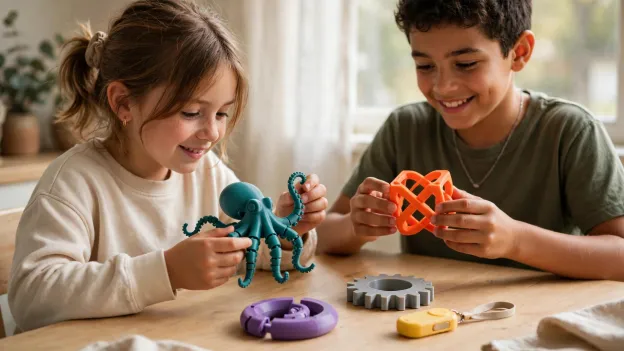
12 3D Printed Fidget Toys Kids Can Print and Customize
3D printed fidget toys run from a clicker keychain that prints in about 20 minutes to an infinity cube that can take three or four hours. All 12 below come in versions small enough for a 120 mm print area, and every one prints in PLA.
For each project we’ve listed a rough print time, whether it has moving parts, and the filament we’d use. The list starts with solid shapes that can’t jam and ends with hinged, folding toys that need a well tuned printer.
Kids can change the color, size or name on most of them. None of the 12 uses magnets, steel balls or bought bearings, which matters if there’s a toddler in the house.
12 Best Fidget Toys to 3D Print at a Glance
Times are estimates for a palm sized print at normal PLA settings, taken from designers’ notes where they give one. Filament picks follow our guide to the best filament for moving toys.
|
Fidget toy |
Rough print time |
Moving parts |
Filament |
Skill level |
|
1. Textured worry stone |
20 to 45 min |
No |
PLA |
First print |
|
2. Finger maze coin |
25 to 50 min |
No |
PLA |
First print |
|
3. Texture sampler tile |
30 to 60 min |
No |
PLA |
First print |
|
4. Compliant clicker keychain |
About 20 to 50 min |
Yes, it flexes and snaps |
PLA (the designer advises against PETG) |
Easy |
|
5. Mini toggle switch |
45 to 90 min |
Yes, a pivoting lever |
PLA |
Some assembly |
|
6. Captive slider |
50 to 110 min |
Yes, a sliding block |
PLA |
Some practice |
|
7. Spinning fidget ring |
40 to 90 min |
Yes, rings that rotate |
PLA |
Easy |
|
8. Print in place spinner |
1 to 2 hours |
Yes, a printed bearing |
PLA |
Needs a tuned printer |
|
9. Gear fidget |
1 to 2.5 hours |
Yes, meshing gears |
PLA |
Some practice |
|
10. Articulated octopus |
1.5 to 3.5 hours |
Yes, jointed tentacles |
PLA |
Some practice |
|
11. Mini flexi dragon |
1.5 to 3.5 hours |
Yes, linked body |
PLA |
Some practice |
|
12. Infinity cube |
2 to 4 hours |
Yes, eight hinges |
PLA here; PETG on printers that support it |
Needs a tuned printer |
What You Need to 3D Print Fidget Toys
Not much. A printer that handles PLA, a tested model file, a spool in a color your child likes, and a grown up for the hot parts.
|
NO PRINTER IN THE HOUSE YET? Fidget toys make a good first reason to get one. AOSEED’s 3D printers for families are built for exactly this size of project. |
A Printer That Prints PLA Cleanly
Any filament printer will do, as long as its first layers come out flat, since that’s where moving parts tend to fuse. Small fidgets are one of the main reasons we built the AOSEED X-MAKER JOY for young makers.

It’s made for ages 4 to 12, prints PLA inside an enclosed build area, and has a 120 × 120 × 120 mm print space, plenty for these toys. Your child picks the model in the app. You load the filament and lift the toy out when it’s cool.
A Model Someone Has Already Printed
Pretty renders aren’t proof. We’d pick files with lots of photos from people who printed them, and read the designer’s notes on orientation and supports. Our roundup of easy 3D printed toys lists more starter models that have been printed many times.
The AOSEED app has thousands of ready to print models, and big free libraries like Printables, Thingiverse and MakerWorld have more. Check the license too, since some designers don’t allow selling copies.
An Adult for the Hot Parts
The nozzle runs hot and parts move during a print. An adult loads filament, removes supports and checks the toy before it’s handed over. UL’s Chemical Insights team also recommends printing in a well ventilated spot.
Easy 3D Printed Fidget Toys With No Moving Parts
These three are one solid piece. Nothing can jam, so they’re the best place to start, and they show texture better than anything with joints.
1. Textured Worry Stone
Plan on 20 to 45 minutes in PLA, and there are no moving parts. It’s a smooth oval about the size of a palm with a shallow dip for the thumb, and some versions add ridges or dots on one side.

Kids can pick the outline (a heart, a cloud, a plain pebble), choose a color, and add their initials on the back. We’d round every edge, since this one lives in a pocket.
2. Finger Maze Coin
This takes 25 to 50 minutes in PLA, with no moving parts. A raised maze or spiral covers a flat disc, and a fingertip follows the path round and round.

Older kids like changing the path width or drawing their own spiral in a design app. Wider, rounded grooves feel nicer than thin sharp ones, and they print more cleanly too.
3. Texture Sampler Tile
Expect 30 to 60 minutes in PLA, and again nothing moves. One small tile is split into sections, maybe waves, dots, ridges and a smooth patch, so fingers can compare them.

It’s a nice first design project. Kids decide which textures go where and how tall the bumps are, then see how a pattern on a screen turns into something they can feel.
Clickers and Sliders: Fidgets With Moving Parts
This is where 3D printed fidgets start to click. Each of these moves in a different way, by bending, pivoting or sliding.
4. Compliant Clicker Keychain
One popular design, the bistable keychain by FabianVeile, prints in roughly 20 to 30 minutes going by its designer’s notes. It’s a single PLA piece, yet it moves: press it and it snaps from one shape to the other.
There’s no hinge. The plastic itself bends, which engineers call a compliant mechanism. Its designer recommends PLA and warns that PETG may be too stiff.

Thin flexing plastic does wear out, so a clicker that gets snapped all day will crack eventually. Printing a spare is part of the fun.
5. Mini Toggle Switch
Give it 45 to 90 minutes in PLA. It has moving parts, a little lever that rocks inside a housing with a satisfying click, and no wires or electronics at all.

Some switch models print in place, while others come as four or so pieces that push together. Two colors, one for the lever and one for the box, make it look store bought.
6. Captive Slider
This one runs 50 to 110 minutes in PLA, with a block that slides back and forth along a track inside a frame. The block is trapped, so it can’t fall out and get lost.

Kids learn about clearance here. Too tight and the block sticks, too loose and it rattles. We’d skip any slider that uses magnets, for reasons covered in the safety section below.
Spinners and Gear Fidgets
Spinning toys are the classic fidget. All three below rotate on printed parts alone, with no bearing to buy.
7. Spinning Fidget Ring
It usually prints in 40 to 90 minutes in PLA, and it has moving parts: rings nested inside each other that turn on their own. Most versions print in place, so the ring comes from the plate already working.

Kids can pick the ring size, add a pattern to the outer band, or swap colors partway through for a striped look.
8. Print in Place Fidget Spinner
Allow 1 to 2 hours in PLA. The spinner turns on a bearing that’s printed as part of the toy, instead of the steel 608 skateboard bearing many spinners need.

Printed bearings usually don’t spin as long as steel ones, and they only work if the printer’s first layer is spot on. We’d try this after the ring has printed well.
9. Gear Fidget
Somewhere between 1 and 2.5 hours in PLA, depending on size. Two or three gears mesh on a base, so turning one makes the others move the opposite way.

Start with plain spur gears. Planetary gear spinners look great but need tighter calibration, and some designs take several hours. A gear keychain is a quicker way to see the idea.
Articulated and Folding Fidget Toys
These take the longest and have the most joints, so they’re best once a few simpler prints have come out well.
10. Articulated Octopus
Expect 1.5 to 3.5 hours in PLA. Each tentacle is a chain of small jointed segments printed already linked, so the whole octopus wiggles as soon as it leaves the plate.

One well known version prints the tentacles with no infill, which makes them light but fragile. We’d keep it for kids old enough to play gently, and check the joints now and then.
11. Mini Flexi Dragon
This also lands around 1.5 to 3.5 hours in PLA, with a body made of linked sections that bend and curl. Keychain sized dragons often need no supports.

Pick a model that’s already designed small. Shrinking a big dragon also shrinks the gaps in its joints, and they can fuse shut. Color changing filament makes the movement easy to see.
12. Infinity Cube
Budget 2 to 4 hours. Eight small cubes are joined by hinges, so the block folds over and over in a loop. It has more moving parts than anything else here.

PLA works, and some makers use PETG for tougher hinges on printers that support it. The X-MAKER JOY prints PLA, so we’d stick with that and handle the hinges gently at first, since they can be stiff when fresh from the plate.
How Kids Can Customize Their Fidget Toys
Customizing is half the reason to print a fidget instead of buying one. Most changes are easy, as long as nobody touches the moving parts.
Colors and Two Tone Prints
Picking the filament color is the simplest change. Pausing the print partway and swapping spools gives a striped or two tone toy without any extra hardware.
Names, Initials and Shapes
Solid fidgets like the worry stone or maze coin take a name or a symbol easily. The AOSEED app’s design games let kids add shapes and personal touches without learning CAD.
Size, With One Warning
Scaling a solid shape is fine. Scaling a toy with joints is risky, because the tiny gaps between parts shrink too and can fuse. Look for a model that already comes in the size you want.
Designing Their Own
Once a child has printed a few, they often want to invent one. The AOSEED Creative Hub has more project ideas to start from.
Print in Place vs Assembled Fidget Toys
Print in place toys come out of the printer already moving, which kids love. They depend on small, even gaps between parts, so they’re fussier about printer settings.
Assembled toys print as separate pieces that snap or push together. They’re more forgiving and let kids mix colors, but parts can go missing, which matters with younger siblings.
Why Moving Parts Get Stuck, and How to Avoid It
A Squashed First Layer
If the first layer is pressed too flat, it spreads into the gaps and glues parts together. Our guide to the slicer settings that matter for small parts explains first layers and supports.
Scaled Down Models
A joint designed with a 0.3 mm gap at full size has far less at half size. That’s the most common reason a print in place toy comes out solid.

Not Testing First
Print a small ring or a single hinge before a three hour cube. NASA calls this the test and improve step of the design process, and it saves a lot of filament.
Let a print cool fully before flexing it. If a joint won’t move after a gentle twist, forcing it usually snaps it.
Are 3D Printed Fidget Toys Safe for Kids?
They can be, if the design suits the child’s age and an adult checks each print. A few things deserve extra care.
Small Parts
Tiny fidgets, loose segments and broken hinge pieces are choking hazards for toddlers. CPSC’s small parts rules keep pieces like these out of toys for children under 3, so store them out of reach.
Magnets
We kept magnetic fidgets out of this list on purpose. In August 2026 the CPSC recalled magnetic fidget sliders after a child pulled two small magnets out of one and swallowed them, and was hospitalized.
Edges and Cracks
Sand or trim sharp edges, and throw away fidgets with cracked hinges. The AAP’s advice on buying safe toys also says to follow age ranges and keep parts bigger than a child’s mouth.
Toys, Not Study Aids
We think of fidgets as fun things to make and hold. One classroom study, covered by CHADD’s Attention Magazine, found the children it followed made more attention errors while using fidget spinners, so results vary a lot from child to child.
Final Thoughts on 3D Printed Fidget Toys
The best 3D printed fidget toys for kids are the ones they help choose and change. Start with a worry stone or a clicker, move on to a ring or a gear, and save the octopus and infinity cube for when the printer is dialed in.
If your child keeps asking what else they can make, there’s plenty more at AOSEED’s home for kids’ 3D printing.
FAQs
What are the easiest 3D printed fidget toys for beginners?
Solid ones with no moving parts. A worry stone, a finger maze coin or a texture tile prints in under an hour and can’t jam. A compliant clicker or a print in place ring is a good next step.
Where can I find free STL files for fidget toys?
The AOSEED app has thousands of ready to print models, and free libraries like Printables, Thingiverse and MakerWorld have many more. Look for designs with lots of make photos and check the license.
How long does it take to 3D print a fidget toy?
Roughly 20 minutes to 4 hours. Small solid pieces often finish in under an hour, while articulated animals and infinity cubes take a few hours. Our guide to how long 3D prints take has more examples.
What filament is best for 3D printed fidget toys?
PLA for most kids’ projects. It prints cleanly and works for rings, gears and clickers. PETG can give tougher hinges, but only on printers that support it.
Can you 3D print fidget toys with moving parts?
Yes. Print in place designs come out of the printer with working hinges, rings or gears, as long as the gaps between parts print cleanly. Assembled designs snap together after printing.
Why are the moving parts on my 3D printed fidget stuck?
Usually a squashed first layer, a model scaled down too far, or supports filling the gaps. Let it cool, try a gentle twist, and reprint at full size with a flatter first layer if it won’t free up.
Are 3D printed fidget toys safe for kids?
With checks, yes. Avoid magnets and tiny loose parts around children under 3, sand sharp edges, and replace anything that cracks. An adult should handle the printer’s hot parts.
Can kids customize 3D printed fidget toys?
Yes. They can change colors, add initials to solid fidgets, and pick from different shapes. Changing the size or the joints of a moving toy can stop it working, so leave those alone.



Further reading

3D Printed Puzzles for Kids by Age: 9 Projects From Shape Boards to Puzzle Boxes

15 Easy STEM Activities for Kids Using Things You Already Have

Is a 3D Printer a Good Gift for a Kid? A 10 Point Christmas Checklist for Age, Cost, and Space


