

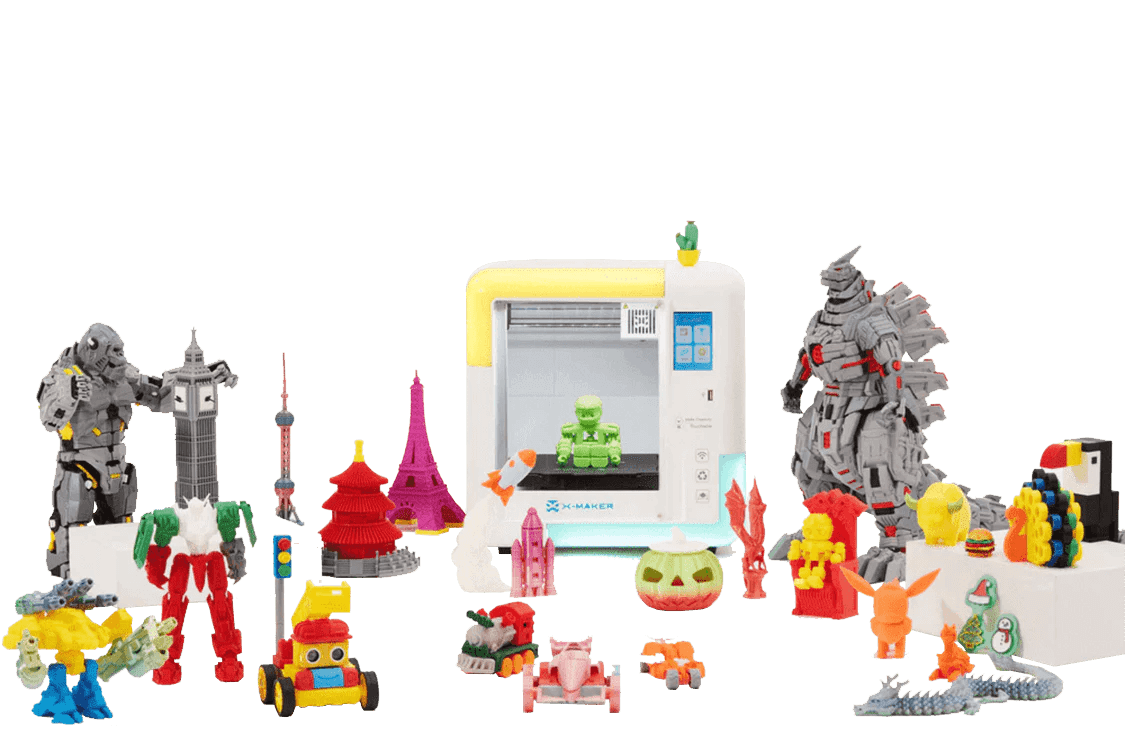
3D Print Shop vs. Home Printer: Which is More Cost-Effective for Making Kids' Toys?
Want to save money while making creative toys for your kids? Here’s the answer: If you plan to print kids' toys frequently, investing in a cost-effective home printer like the AOSEED X‑MAKER ($399.99) is the smarter long-term choice. For occasional, complex, or one-off projects, a 3D print shop may be more suitable.
Key Takeaways: Which is more cost-effective?
-
Home 3D Printing: Higher upfront cost ($259.99–$399.99), but lower per-toy costs over time. Ideal for frequent toy-making and hands-on STEM learning.
-
3D Print Shops: No initial investment, but each toy costs $5–$20. Best for infrequent or intricate designs where flexibility and customization are limited.
Quick Comparison:
|
Feature
|
AOSEED X‑MAKER Home Printer
|
Print Shop Services
|
|
Initial Cost
|
$259.99–$399.99
|
None
|
|
Per-Toy Cost
|
$1–$3 (PLA filament)
|
$5–$20 per toy
|
|
Learning Value
|
Hands-on STEM experience
|
Limited
|
|
Design Flexibility
|
Real-time tweaks possible
|
Requires finalized files
|
|
Best For
|
Frequent toy-making
|
Occasional prints
|
For regular toy-making and STEM education, the AOSEED X‑MAKER is a cost-effective and engaging option. Choose print shops for rare, complex, or larger projects.
Revealing the TRUE Costs of 3D Printing!
![]()

Discover the Toy Library: 2000+ Models Included
One of the biggest advantages of choosing an AOSEED home printer is free access to the exclusive AOSEED Toy Library, which features over 2000 ready-to-print 3D models. From dinosaurs and animals to logic puzzles, mini vehicles, and educational STEAM projects, there’s something for every age group and interest.
Unlike 3D print shops where custom files often come with extra charges or licensing limitations, AOSEED Toy Library is included with every printer purchase. This means you can start printing immediately—without hunting for STL files or paying additional design fees.
Whether you're building a collection of action figures or exploring wind-up mechanical toys, the Toy Library offers a rich, ever-expanding playground for creativity and learning.
Growing C
![]() ommunity, Lifetime Updates
ommunity, Lifetime Updates

![]()
![]()
![]()
AOSEED isn’t just a printer it’s a full ecosystem. When you invest in a home 3D printer like
![]() the X-MAKER or X-MAKER JOY, you’re joining a vibrant, family-friendly maker community.
the X-MAKER or X-MAKER JOY, you’re joining a vibrant, family-friendly maker community.
The AOSEED team regularly pushes firmware and software updates, expanding features and toy categories over time. You’ll also have access to a support community where parents and educators share print ideas, tips, and new designs.
In contrast, print shops offer no community, limited engagement, and static one-time services. With AOSEED, the printer grows with your child—offering lasting value beyond the initial purchase.
Cost Breakdown: 6-Month Toy-Making Showdown
Let’s break down the real costs of making one toy per week over 6 months.
|
Scenario
|
Initial Cost
|
24 Toys (Avg $ per toy)
|
Total Cost
|
|
AOSEED X-MAKER
|
$399.99
|
~$48 (filament)
|
$447.99
|
|
Print Shop
|
$0
|
~$288 ($12 avg per toy)
|
$288
|
Cost Analysis
Let's break down the costs of AOSEED home printers versus print shops for creating kids' toys.
Home Printer Costs
The AOSEED X‑MAKER costs $399.99, while the more affordable X‑MAKER JOY is priced at $259.99. Beyond the initial purchase, you'll need to account for ongoing expenses like:
-
PLA filament: $20–$40 per kilogram
-
Replacement parts (e.g., hotend): Around $30
This setup requires an upfront investment, but the per-print cost drops significantly over time, especially when producing multiple items.
Print Shop Costs
Print shops charge per item based on size, material, and complexity. Here's a typical breakdown for desktop models:
-
Small toys (2–3″): $5–$8
-
Medium toys (4–6″): $10–$15
-
Large toys (7″+): $15–$20
Additional expenses can include custom design work, post-processing, packaging, and shipping. While print shops eliminate the need for an upfront investment, the per-item fees can add up quickly. For example, printing 10 medium-sized toys at $12 each will cost $120, not including design or shipping fees.
If you're planning to produce multiple items, home printing can quickly become the more economical choice.
Next, we'll explore design options and accessibility.
Design Options and Access
When it comes to creating custom toys, design flexibility plays a huge role in fostering creativity and learning. Home 3D printers and print shops offer different experiences: home printers allow for real-time design tweaks and hands-on experimentation, while print shops require pre-finalized files and often involve waiting times. Let’s break down the features of each option.
Home Printer Features

![]()
The AOSEED X-MAKER is packed with tools to make toy creation easy and fun. It offers 14 different toy-building apps, including options for creating dolls, flexible models, vehicles, wind-up toys, and even 3D drawings. It also features:
-
One-touch printing for quick projects
-
A mobile app slicer for intermediate users
-
Advanced Cura-based slicing software for full control over print settings
-
Access to a library of 2000+ free models to jumpstart your creativity
This setup allows users to experiment and refine designs right away, making it ideal for learning and reducing material waste.
Print Shop Limitations
Print shops, on the other hand, operate differently. They require finalized STL files for printing. If changes are needed, you’ll have to resubmit the file and go through the queue again, which can take several days. Unlike home printers, print shops don’t offer interactive design tools. This makes it harder to test and improve designs on the fly, which can lead to wasted time and materials.
With a home printer, you get the freedom to tweak and test designs instantly, offering a more hands-on and efficient way to learn and create.
Return on Investment
Priced at $399.99, the AOSEED X‑MAKER offers an upfront cost balanced by long-term savings and a hands-on approach to STEM learning.
Learning at Home
Home printing with the AOSEED X‑MAKER is designed for safe and enclosed use, offering a learning path that grows with the user. It transitions smoothly from beginner-friendly features to more advanced controls:
-
Beginner: Simple one-click printing introduces basic concepts.
-
Intermediate: Kid-friendly apps encourage creativity and spatial thinking.
-
Advanced: Full slicer control helps develop technical problem-solving skills.
Print Shop Benefits
Print shops can be a great alternative when home printers fall short:
-
Complex Projects: Ideal for intricate designs or larger toys that go beyond the X‑MAKER 150 × 150 × 150 mm build capacity.
-
One-Off Prints: Perfect for occasional projects without the need for ongoing maintenance.
-
High-Detail Items: Best for models requiring industrial-level precision or specialized materials.
For families who prioritize frequent toy creation and STEM education, the AOSEED X‑MAKER stands out with its safety features, user-friendly design, and potential for skill development. Up next, we'll break down these options side by side to help you decide what works best for your family.
Side-by-Side Comparison
Here’s a breakdown of how the AOSEED X‑MAKER home printer stacks up against typical print shop services:
|
Feature
|
AOSEED X‑MAKER Home Printing
|
Print Shop Services
|
|
Initial Investment
|
$399.99 for the printer, toolkit, and starter PLA roll
|
No upfront equipment cost
|
|
Ongoing Costs
|
PLA filament ($20–$40/kg), tool-head replacement ($30)
|
Costs vary per print
|
|
Build Volume
|
150 × 150 × 150 mm
|
Usually supports larger volumes
|
|
Materials
|
Works with PLA, PETG, ABS
|
Offers a wider range of industrial-grade materials
|
|
Design Options
|
- Access to 2000+ models - Toy-building apps - Full slicer support via USB
|
Dependent on shop software and equipment
|
|
Learning Value
|
- Hands-on STEM experience - Three difficulty levels in X‑Print slicer
|
Limited skill-building opportunities
|
Making the Choice

When Home Printing Makes Sense
The AOSEED X-MAKER, priced at $399.99, is a smart choice for families who plan to print toys regularly. Here’s why:
-
Frequent STEM Projects: With access to a library of over 2000 models, three slicer difficulty levels, and an easy one-touch setup, it’s perfect for weekly toy-making without added expenses.
-
Growing With Your Child: Features like a USB port and full slicer support mean the X-MAKER can keep up as your child’s skills improve over time.
When to Use Print Shops
Print shops are better suited for specific scenarios:
-
Occasional Prints: Ideal for families who only need a toy or model every now and then, with pay-per-item pricing.
-
Specialized Models: Great for accessing industrial-grade materials or handling more complex designs.
-
Infrequent Use: Perfect for those who don’t print often and prefer per-project costs.
For hands-on STEM learning and frequent use, home printing with the AOSEED X-MAKER is a cost-effective option. On the other hand, print shops are better for one-time, intricate, or larger-scale projects.
Conclusion
At $399.99, the AOSEED X‑MAKER offers a cost-effective way to combine toy-making with hands-on STEM learning for kids. It can save money on per-item print-shop fees if you're producing toys regularly. The printer features beginner-to-advanced print modes, over 2000 pre-designed models, 14 design apps, a 150×150×150 mm build volume with a print speed of 300 mm/s, and supports PLA, PETG, and ABS materials - all within a fully enclosed, child-safe design.
While print shops are great for occasional or highly complex projects, the X-MAKER is ideal for families who want a safer, more educational, and versatile option for frequent toy-making and STEM activities. Interested in unlocking your child’s creativity while keeping costs down? Visit AOSEED to learn more about the X‑MAKER and its extensive model library.



Further reading

Thanksgiving STEM Activities for Kids: Table Projects and Simple Engineering Challenges
Thanksgiving dinner takes hours to cook. Most kids are bored within the first one.
A bag of cranberries, a box of toothpicks, a roll of foil and a few balloons can change that. Give those supplies ...

Halloween STEM Activities for Kids: Spooky Builds That Teach Real Science
Halloween hands kids a stack of ready made science questions. Why does a pumpkin foam over? Why do ghosts melt faster with salt? How much candy can a cotton swab bridge hold?
The 16 activities belo...

STEM Crafts for Kids: Build, Decorate and Test
Pick crafts kids can test, not just finish. Build it, make it theirs, measure what it does, then change one thing and try again.
A paper helicopter takes five minutes to fold. Timing ten drops, tri...

STEM Games for Kids: Logic, Math and Building Games to Play Together
Give a seven year old a worksheet and you get ten minutes of sighing. Give the same kid 20 sticks of spaghetti, some tape and a marshmallow, then say the tallest tower wins. Different afternoon.
ST...


