

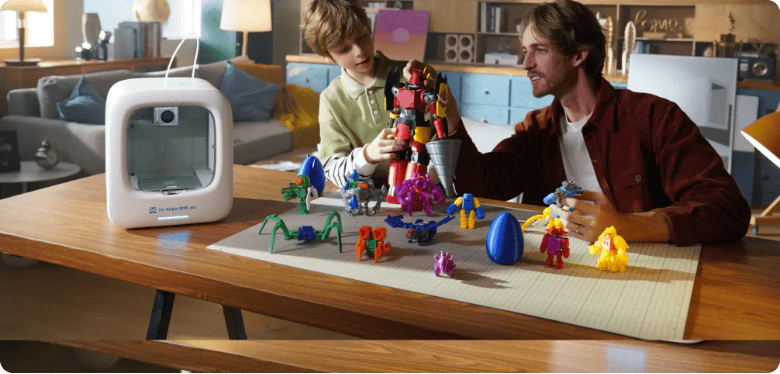
Parent-Supported Maker Time: What to Do and What to Let Kids Do
The best creative sessions are not the ones where the parent has done the most work. They are the ones where the child has.
When a parent sets up a 3D printing session and then gradually hands over every decision to the child — which model, which color, when to start, how to decorate — the child does not just produce an object. They produce an object they can describe as entirely their own. That ownership is what converts a one-time activity into a lasting habit.
Parent-supported maker time is a specific kind of involvement: parent as facilitator, not director. At AOSEED, the sessions that generate the most repeat engagement are those where the parent handled the setup and the child handled everything else. This guide is organized around that principle — showing clearly what to do, and what to hand over.
|
2 roles Parent facilitates. Child creates. |
1 rule Child leads all creative decisions |
5 sessions Typical time to full child independence |
Ages 4–15 Spectrum from watch to lead |
Why Parent-Supported Maker Time Matters
 The research on maker-based learning is clear. Edutopia's analysis of parent-supported learning through maker projects identifies that children in parent-facilitated making environments develop stronger problem-solving habits and more durable creative confidence than children in unsupported environments — precisely because the parent's presence reduces the anxiety of failure without removing the ownership of success.
Enhancing Learning and Creativity
3D printing sessions are among the most complete learning experiences a child can have at home. A single session involves visual design thinking (what do I want to make), material science (which filament color and how it behaves), mechanical understanding (how the printer works), patience (waiting for the print), and tactile creativity (decorating the finished object). No single classroom subject delivers all five in the same afternoon.
Building Confidence Through Creativity
The confidence-building effect of maker time is specifically connected to object permanence — the child makes something and it stays made. The printed object does not disappear when the session ends. It goes on the shelf. It gets used. It gets described to grandparents on a Sunday. Every session that ends with a physical object adds one more piece of evidence that the child is a maker — and that identity compounds across sessions in a way that abstract praise alone cannot.
Learning Effective Collaboration
The Child Mind Institute's guidance on how parents can support their child's creativity emphasizes that shared creative work is most effective when both participants have defined, complementary roles. When a parent is 'the one who sets it up' and a child is 'the one who decides what gets made,' both roles are clear and meaningful. This complementarity is what prevents the parent from taking over and the child from disengaging.
How to Support Your Kids During Maker Time
Support in a maker session is not the same as supervision. Supervision watches for problems. Support creates the conditions for independent success. The two table formats below define both the role distribution and the involvement level appropriate for different stages of your child's maker journey.
What to Do and What to Let Kids Do — Session by Session
|
|
Parent Does |
Child Does |
|
Setup |
Position the printer, load filament, confirm first layer |
Watch through the observation window. Name what they see. |
|
Software |
Open the app. Navigate to the Toy Library. Filter by age. |
Browse, scroll, choose the model. Press download. |
|
Session planning |
Set out decoration supplies before the session begins |
Choose the filament color. Decide what they want to make next. |
|
Print monitoring |
Remain available — not hovering. Check in every 15 minutes. |
Watch the layers appear. Note the progress out loud. |
|
Post-print check |
Inspect for sharp edges. Confirm parts are cool to touch. |
Pick up the finished object. Test it. Celebrate. |
|
Decoration |
Set out supplies. Describe options briefly. |
Lead entirely — color, technique, and what to paint. |
|
Next session |
Keep the Toy Library updated. Note what the child enjoyed. |
Choose next week's project. Describe what they want to make. |
Providing Clear Guidance Without Taking Over
|
The Facilitator Rule Handle everything that requires physical safety awareness (hot nozzle, bed temperature, filament tension) or software knowledge (slicing settings, file transfer). Leave everything that involves creative preference (model choice, color, decoration, display) entirely to the child. When these two categories are consistently separated across sessions, children internalize their creative role very quickly. |
Encouraging Independent Problem-Solving
The fastest way to reduce a child's creative independence is to solve problems before they feel them. A print that looks slightly unexpected is an opportunity — not a failure — if the parent responds with curiosity rather than correction. The guiding question table below provides specific language for the most common maker session challenges.
|
Situation |
Guiding Question Instead of a Fix |
|
Print looks wrong |
'What do you think is different from what you expected? What could we try to change?' |
|
Child gives up |
'How much is done already? What is the smallest next step we can take right now?' |
|
Wrong color choice |
'Does that change how much you want to play with it? How could you use that color?' |
|
Decoration goes off-plan |
'Is this what you wanted? Does that bother you, or do you like it anyway?' |
|
Print takes too long |
'What would you like to do while we wait? What could you be planning for the decoration phase?' |
|
Assembly doesn't fit |
'What part needs to move to connect? Could we try a different angle?' |
Balancing Involvement and Independence
Parent Involvement Spectrum — Where Are You in the Session?
|
Level 1 Full setup |
Level 2 Available |
Level 3 Collaborative |
Level 4 Advisory |
Level 5 Independent |
|
Parent sets up everything. Child watches and observes. |
Parent present in room. Child operates with permission check. |
Both decide together. Parent explains; child executes. |
Child leads. Parent answers questions when asked. |
Child plans, sets up, prints, and decorates independently. |
Most families begin at Level 1 or 2 — this is correct. The printer is new, the workflow is unfamiliar, and the child needs to see the full session flow before they can lead any part of it. By session five, most families reach Level 3. By session ten to fifteen, Level 4 and 5 become possible depending on the child's age and the session type chosen.
Best 3D Printing Projects for Kids
Matching the right project to the child's current skill level and the parent's current involvement level produces the most independent, engaged sessions. The skill table below provides the complete framework.
|
|
Beginner Ages 4–7 |
Intermediate Ages 8–12 |
Advanced Ages 13+ |
|
Project type |
Single-piece, no assembly |
Multi-part, simple assembly |
Custom design or creation kit |
|
Parent role |
Full setup + present throughout |
Setup + available for questions |
Setup filament only |
|
Child role |
Choose model + color + watch |
Choose + modify + decorate |
Plan + design + print + build |
|
Print duration |
5–25 min |
25–60 min |
45–120 min |
|
Session end |
Object in hand immediately |
Object + decoration = complete |
Testing and iteration may take more than one session |
|
Skill developed |
Creative confidence + patience |
Problem-solving + decoration |
Engineering + design thinking |
Simple and Fun 3D Printing Ideas for Beginners

|
Beginner Ideas — Single-Part, Instant Play Ages 4–7 · 5–25 min |
|
Bonding note: The adult-present but child-directed session is where creative confidence is first built. The more the child leads in sessions 1–5, the more independently they will approach session 6. Find it: AOSEED Toy Library |
Intermediate 3D Printing Projects for Kids

|
Intermediate Ideas — Multi-Part with Assembly Ages 8–12 · 25–60 min |
|
Bonding note: This is the level where a parent describing themselves as 'helping with maker time' is most accurate — the child is doing the substantive creative and technical work, and the parent is there for support. Find it: AOSEED Toy Library |
Advanced 3D Printing Projects for Teens

|
Advanced Ideas — Custom Design and Creation Kits Ages 13+ · 45–120+ min |
|
Bonding note: The teen-level creation kit session is where maker identity is fully formed. The parent who resists involvement at this stage is giving the most valuable gift: complete creative ownership of a complex, multi-session build. Find it: AOSEED X-MAKER STEM sessions |
The AOSEED Toy Library covers all three levels. The session-length and complexity filters make it straightforward to find the right project for any given afternoon and any given level of parent involvement. Weekly additions mean there is always a new option without needing to look outside the ecosystem.
How to Choose the Right 3D Printing Ideas for Your Child
 The best ideas for 3D printing are the ones that match three variables simultaneously: the child's current interest, the appropriate session length for the day, and the project complexity that fits the current involvement level. Use the interest grid below as the starting filter.
|
Loves vehicles |
Loves animals |
Loves giving |
Loves how things work |
|
Race cars, pull-back mechanisms, train cars. Clear mechanical behavior. Functional success signal: the vehicle moves. |
Flexi figurines, habitat projects, species collection. Personal emotional investment. Decoration phase is naturally engaging. |
Name keychains, gift frames, personalized objects. Recipient is the creative anchor. Purpose-driven sessions are highly motivated. |
STEM gear sets, spinning tops, fidget mechanisms. Test of success is physical and immediate. Engineering curiosity drives patience. |
Age-Appropriate Designs
The single most important thing to know about age-appropriate project selection is not about the child's skill level — it is about session length. A 4-year-old can engage with a sophisticated-looking project if it prints in 10 minutes. A 14-year-old might struggle with a technically simple project if it takes 90 minutes and provides no intermediate success signals. Match session length to the child's current patience window first, then match complexity to their current skill level.
Matching Interests with Projects
The parent's role in project selection is not to decide what gets made — it is to surface relevant options and let the child choose between two or three of them. 'Do you want the dinosaur or the elephant?' is a parent-supported creative decision. 'We're printing the dinosaur today' is not. This distinction matters because the child who made the choice is the child who is invested in watching the print and excited to decorate the result.
Ensuring a Clear Outcome
For families new to maker time, every project should end with an object the child can hold and use immediately. The AOSEED X-MAKER JOY app-led workflow is designed with this in mind: the model library shows the finished object before the session starts, so the child always knows what they are working toward. This preview is a small detail with a significant effect on session motivation — the child who can see the goal is the child who stays engaged through the print wait.
Safety Considerations for 3D Printing with Kids
 Safe maker time is the foundation of repeated maker time. When every session runs without safety concerns, the parent's attention can stay on the child's experience rather than the equipment. These four rules make that possible across every session type and age range.
|
✓ |
PLA — safe for all ages and all session types: Non-toxic, plant-based, low odor, wide color range. The default material for every beginner, intermediate, and advanced project in this guide. No ventilation requirement. |
|
✓ |
PETG — for functional and active toys: More durable and impact-resistant. Good choice for vehicles, fidget mechanisms, and creation kit components that will be used daily. Same non-toxic profile as PLA. |
|
⚠ |
Post-print inspection — parent task, every session: Brief surface check before the object passes to the child. This stays a parent task across all involvement levels until the child has demonstrated the habit independently, typically around Level 3–4. |
|
✗ |
No resin or ABS for family maker sessions: Both require conditions incompatible with shared family spaces. Neither is needed for any project type in this guide. PLA and PETG cover every use case described here. |
Selecting Safe Materials
The filament color the child chooses is a creative decision. The filament type the parent loads is a safety decision. Keeping these two decisions clearly separated — the child picks the color, the parent confirms the material is PLA — is a practical model that works at every involvement level from 1 to 5 and communicates the underlying safety principle without making it a restrictive rule.
Preventing Hazards During 3D Printing
Building the post-print inspection into the session as a named transition step prevents it from feeling like an interruption. 'Now we check it before you start decorating' becomes a reliable part of the session flow. Children who have seen the check happen in every session begin to perform it themselves without prompting — typically within ten to fifteen sessions, depending on age.
Ensuring Safety During the Printing Process
An enclosed printer design is the most significant single safety feature for family maker sessions because it creates a permanent physical boundary between the print in progress and the child's hands. The child's role — watching through the observation window — is physically defined by the enclosure. This means the safety feature and the session role are the same thing. The child is not kept away from the printer; they are given the correct, safe way to engage with it.
How to Make 3D Printing Fun and Easy for Kids
 A maker session stays engaging when the setup is smooth, the decisions belong to the child, and the session ends with something real. These five setup steps produce that experience reliably.
|
1 |
Choose the project the evening before Browse the Toy Library with the child on Sunday evening. Two or three options, child picks one. By the time the session starts the next day, the decision is already made and the anticipation has been building overnight. |
|
2 |
Set up the printer before the child is present Load the filament, confirm settings, and position the printer before the session begins. The child's first moment with the printer is pressing start — not watching a parent struggle with setup. |
|
3 |
Describe the five-step session flow once at the start 'We choose, we load, we press start, we watch, we decorate.' One sentence. Then begin. Children who know the session structure arrive at each phase with correct expectations. |
|
4 |
Set out decoration supplies before the cool-down ends Paint markers, stickers, and whatever else is available — out and ready before the print cools. The transition from print-done to decoration begins immediately. No searching for supplies. |
|
5 |
Display the finished object together Name it. Choose where it lives. Tell someone else in the household about it. These three small acts of social recognition close the session properly and generate the anticipation for the next one. |
Choosing Projects that Match Their Interests
Interest-matched sessions produce the most patient print waits. A child who is watching a dinosaur print does not need to be reminded to be patient — they are managing their own patience because the outcome matters to them. The parent's role in interest matching is to build a library of two to three projects per category (vehicles, animals, gifts, STEM) and present the right category for the right child on the right day.
Starting with Structured, Easy-to-Follow Projects
Single-piece prints that come off the plate immediately usable are the right entry point for every new maker and every new session type. The child who has experienced a successful 5-minute session is a child who will sit through a 45-minute session without anxiety — because they know the session structure works and the object at the end is real.
Adding Customization and Personalization
Customization grows in scope across sessions: filament color (session one), decoration choices (session two onward), model modification (sessions ten to fifteen onward), original design (advanced level). Introducing one new customization type per session phase keeps the creative development visible and exciting for the child without overwhelming any individual session.
Conclusion
Parent-supported maker time is not about how involved the parent is. It is about what the child owns. The parent who sets up the printer, loads the filament, and then sits beside the child and asks 'what do you want to make?' has done exactly the right amount. The child who chooses the project, watches every layer appear, holds the finished object, and decorates it the way they decided — that child has had a complete maker session.
Start at Level 1. Run the same session structure every week. Watch the involvement level drop as the child's confidence grows. Notice when the child starts asking to do sessions without you.
For families setting up their first parent-supported maker station, AOSEED 3D printers for kids shows both current family models with age guidance — useful for choosing the printer that best supports the involvement level and session types described in this guide.
FAQs
What are parent-supported maker activities?
Parent-supported maker activities are hands-on creative sessions where the parent's role is defined and limited: set up the tools, ensure safety, and create conditions for the child's creative work. The key distinction from other types of family activity is that the child holds all creative decisions — what to make, what color, how to decorate. The parent handles everything that requires technical or safety knowledge.
How do I get my child started with 3D printing?
Run the first session as a complete five-step demonstration: choose a model together (let them pick), load filament together (you load, they watch), start the print together (they press the button), watch the print together, decorate together. The entire first session should be joint so the child has seen the full structure before they are asked to navigate any part of it independently. Session two starts with more child-led steps.
What are the best 3D printing ideas for kids?
The best easy 3D printing ideas for a first session are those with the shortest print time and the most immediate play value: a spinning top (under 5 minutes, spins immediately), a ring whistle (under 20 minutes, makes sound immediately), or a flexi animal figurine (30–60 minutes, joints move immediately off the plate). All three are single-piece, require no assembly, and provide an unambiguous success signal.
How can parents support their kids during maker time?
Define your role clearly before each session. Handle setup and safety. Hand over the creative decisions. Ask guiding questions rather than solving problems. Be present enough to be reassuring and distant enough to require the child to initiate requests. The specific balance shifts across sessions as the child's experience grows — the involvement spectrum earlier in this article provides a session-by-session progression to guide that shift.
What is the 7-7-7 rule in parenting?
The 7-7-7 rule is an informal parenting principle suggesting that children need 7 minutes of focused attention, 7 days of consistent behavior from a parent to form a habit, and 7 weeks of repeated experience to establish a lasting pattern. Applied to maker time, this suggests that a 7-week run of weekly maker sessions — even very short ones — is sufficient to establish the habit and the child's identification with the maker role.
Are 3D printers safe for kids?
Yes, with PLA filament and an enclosed printer design. PLA is plant-based, non-toxic, and produces minimal odor. An enclosed design keeps the nozzle, heated bed, and belts inside a sealed chamber — the child's interaction is through the observation window and the start button. A brief surface inspection after cool-down completes the safety routine. All of these are consistent session habits rather than special precautions.
What are the benefits of 3D printing for kids?
Regular 3D printing sessions develop five things simultaneously: creative decision-making confidence, spatial and mechanical reasoning, patience through the print-to-result cycle, fine motor skill and aesthetic judgment during decoration, and the habit of starting a project and seeing it through to a physical result. The last of these is the rarest and most transferable benefit — the experience of 'I imagined this, I chose it, I waited, I held it' applies to every domain the child enters.
How long does it take to 3D print a toy for kids?
The range is wide and should be used actively in session planning. The fastest cool 3D printing ideas (spinning top, whistle ring) finish in under 5 minutes. Most easy 3D printing ideas suitable for sessions 1 through 10 fall in the 15–45 minute range. Longer intermediate and advanced builds run 45 to 90 minutes. The right duration for any given session is the one that matches the child's patience window that day — choose short on difficult days, longer on calm ones.
Can kids design their own 3D prints?
Yes, and this is the natural progression for children who have completed regular sessions across several months. The AOSEED app's beginner design tools let children modify existing models — changing a name, adjusting a dimension, adding a detail — before the design-from-scratch stage. This modification phase is the bridge between using the Toy Library and creating original designs. Most children reach comfortable model modification within 10 to 20 sessions.
Sources
- Edutopia — Parent-Supported Learning Through Maker Projects, Parent-Supported Learning Through Maker Projects, 2023.
- Maker Faire — Maker Time for Parents and Kids, Maker Time for Parents and Kids, 2023.
- Common Sense Media — How Parents Can Encourage Hands-On Learning, How Parents Can Encourage Hands-On Learning, 2023.
- Tinkercad — 3D Printing Ideas for Parent-Child Collaboration, 3D Printing Ideas for Parent-Child Collaboration, 2026.
- National PTA — Supporting Maker Projects at Home, Supporting Maker Projects at Home, 2023.



Further reading

Thanksgiving STEM Activities for Kids: Table Projects and Simple Engineering Challenges

Halloween STEM Activities for Kids: Spooky Builds That Teach Real Science

STEM Crafts for Kids: Build, Decorate and Test



