Is a Toy 3D Printer a Real 3D Printer? What Parents Should Check
Most toy 3D printers are real 3D printers. A true kids’ model melts plastic filament in a nozzle running near 200°C and builds an object one thin layer at a time, the same process a hobbyist’s desktop machine uses.
What changes is the packaging around that process. Kids’ printers usually stick to PLA plastic, print smaller objects, hide most settings inside a simple app, and wrap the hot parts in an enclosure.
This guide covers what a toy printer can and can’t do compared with a regular FDM printer: nozzle temperature, accuracy, materials, software, and safety. It also shows how to spot a product sold as a “3D toys printer” that isn’t really a printer at all.
Yes, If It Melts Filament and Prints in Layers
Forget the word on the box for a second and look at what the machine does. Plastic filament goes in at the top. A heated nozzle melts it, and the object grows up from the plate, one layer at a time.
That is a 3D printer, whatever color the case happens to be.
The engineering name is fused deposition modeling (FDM). You’ll also see “fused filament fabrication” on some spec sheets, and it means exactly the same thing.
Inside, two small gears grip the strand and push it down into the hot end. It leaves the tip as a line of melted plastic about 0.4 mm wide. The University of Maryland’s introduction to FDM printing walks through those same steps.
What “Toy” Usually Means on the Box
Mostly, the word tells you who the printer was made for. A toy maker 3D printer comes with a model library and an app a child can follow. The case is bright. There’s an age range printed on the side.
Take the shell off, and the parts inside are the same ones any other printer uses.
|
TOY 3D PRINTER OR CRAFT KIT? CHECK THE BOX FIRST Flip the box over. A real printer lists its build size and the plastics it takes, and it says it prints from digital files. If all three are missing, you’re almost certainly holding a craft kit. To see how a toy 3D printer lineup for families is put together, AOSEED’s collection page has both models in one place. |
Lookalikes That Aren’t 3D Printers
Two kinds of products get mixed up with printers all the time. A 3D pen is basically a heated marker: you squeeze, and warm plastic comes out wherever you point it. Mold kits are even simpler, since soft plastic just gets pressed into a shape someone else designed.

Both are fun on a rainy afternoon. Neither one reads a digital file, though. Our kids’ 3D printer vs 3D pen comparison goes through the rest of the differences.
Toy Printers Have Been Tried Before
Mattel tried it in 2016. Its ThingMaker printer came with a design app built in partnership with Autodesk, and then the company pushed the launch back to fall 2017. It was never released.
A lot has changed since then. Printers made for kids today are smaller and quieter. They’re also far less fussy to set up.
Kids’ 3D Printer vs Regular FDM Printer, Side by Side
These are typical differences, and there are exceptions both ways. Some hobby printers are dead simple. Some kids’ printers have more controls than you’d expect.
|
Feature |
Typical kids’ toy 3D printer |
Typical regular FDM printer |
|
How it prints |
FDM, layer by layer |
FDM, layer by layer |
|
Nozzle temperature |
Around 190 to 220°C for PLA |
Same for PLA, up to about 260°C for PETG and ABS |
|
Materials |
Mostly PLA |
PLA, PETG, ABS, TPU, and more |
|
Heated bed |
Often none |
Usually yes |
|
Print size |
Small, often 3 to 5 inches per side |
Usually larger |
|
Settings |
Handled by a guided app |
Full control in slicer software |
|
Hot parts |
Often enclosed |
Often open |
|
Who adjusts things |
Mostly preset |
The user |
Does a Kids’ Printer Run a Cooler Nozzle?
No. PLA needs a nozzle at roughly 190 to 220°C, no matter who the printer is sold to. That’s hot enough to burn skin in an instant.
Why PLA Needs About 200°C
Below that range, PLA doesn’t flow well enough to squeeze through such a tiny opening. So the hot end stays there for the whole print, whether the job lasts 20 minutes or four hours. AOSEED’s own PLA filament for kids’ printers is rated for 190 to 220°C.

Printing Temperature vs Maximum Temperature
Spec sheets mix these two up all the time. Printing temperature depends on the plastic. Maximum temperature is simply the most the hot end can reach.
Regular printers are often built to go to 260°C, because PETG can need that much heat, according to Lehigh University’s filament temperature chart.
When a brand describes a kids’ printer nozzle as “low temperature,” read it as “stops at PLA heat.” It’s still far too hot to touch.
Where the Safety Actually Comes From
The case does most of the work. A door that stays shut while the printer runs keeps fingers out. A nozzle set back from the opening is harder to reach. Sending jobs from a tablet across the room helps, too, because nobody has to lean over the machine.
The nozzle itself stays hot for a while after the print ends. That’s why an adult should be the one lifting finished prints out.
3D Pens Are a Different Story
Some kids’ 3D pens run on PCL, a plastic that melts at about 60°C, which is why children can hold them while they draw. FDM printers don’t work that way. A printer’s nozzle sits near 200°C even when the case is pastel blue and covered in stickers.
How Accurate Is a Toy 3D Printer?
It’s accurate enough to print gears that actually turn. The confusing part is the box, where several numbers sound like they mean “accuracy” and don’t.
Layer Height Is What You See
Run a fingernail down the side of a print, and you’ll feel tiny ridges. Each one is a single layer, usually somewhere between 0.1 and 0.5 mm thick.
Thin layers look smoother. They also take longer, since halving the layer height roughly doubles the number of layers the printer has to put down. Our guide to layer height and nozzle size shows how the two settings affect each other.
Why 0.05 mm on the Box Isn’t the Whole Story
A figure like 0.05 mm normally describes the thinnest layer or the smallest movement the printer can make. Think of it as resolution.
Accuracy asks something else: whether a 20 mm peg you designed actually comes out at 20 mm. Calibration matters there. So do cooling and the design of the model itself. An Oakland University FDM design guide tells engineering students to expect about 0.2 mm of deviation in any direction.

What That Means for Moving Parts
Anything that moves needs a small gap between its parts. Without one, the surfaces that touch can fuse while the plastic is still warm.
Good beginner models already have that gap built in. When a joint does come out stuck, a slightly bigger gap usually fixes it, and you can test that one joint on its own before reprinting the whole toy.

Why Most Kids’ Printers Stick to PLA
Almost every kids’ printer runs on PLA. That says nothing about whether the printer is real. It just means the machine was built around the easiest plastic to print.
PLA Prints Easily at Lower Heat
PLA is commonly made from corn starch, cassava, or sugarcane, according to Baruch College’s MakerHub filament guide. It melts at modest temperatures and grips the plate without much coaxing.
ABS releases more ultrafine particles than PLA, which is one more point in PLA’s favor at home. The tradeoffs are real, though. PLA prints go soft in a hot car, and thin pieces snap rather than bend.
PETG, ABS, and TPU Ask More of the Machine
All three can need more heat than PLA. ABS has an extra problem: it shrinks as it cools, and the corners lift off the plate unless the printer has a heated bed and a warm, closed space around the print.
Most toy printers leave the heated bed out, which keeps them simpler. Our parent guide to heated beds explains what one actually does.
Check Whether the Filament Is Locked
A few toy printers only take their own small filament rolls. There’s nothing unsafe about that, but each print ends up costing more. A printer that accepts any standard 1.75 mm spool gives you far more choice.
When a Child Outgrows PLA
Around the tween years, some kids want tougher parts for robots or cars. The AOSEED X-MAKER with its heated bed handles both PLA and ABS. It adds a touchscreen alongside the app and is meant for ages 9 to 16.
The App Is What Makes It Feel Like a Toy
With a regular printer, you prepare every file yourself. A toy printer’s app does most of that work, and that’s where the “toy” feeling really comes from.
Guided Apps vs Slicer Software
Regular printers send every model through a slicer first. The slicer cuts the shape into layers and plans the path the nozzle will follow. Then it hands you dozens of settings to tune, from print speed to how solid the inside of the model should be.
Our guide to what a slicer does covers those settings in plain terms. On a kids’ printer, the app picks them for you. Your child taps a model, presses print, and goes back to whatever they were doing.

Importing Your Own Designs
At 6, the library that comes with the app is usually plenty. By 10, a lot of kids start downloading designs or making their own, and those files tend to come as STL. Before buying, check that the app can open an STL file.
Safety Checks on a Toy Printer
Calling something a toy doesn’t make a 3D printer safe. These three checks matter more than the label.
Hot Parts and Moving Parts
Look for a door or enclosure that sits between small fingers and the hot nozzle or moving plate. Illinois State University’s 3D printing safety page warns that nozzles can go past 200°C and cause serious burns, including right after a print finishes.
Air and Placement
Every FDM printer gives off some particles while it runs. NIOSH’s guide to safer 3D printing recommends good ventilation and as much distance as possible between the printer and the people around it.
At home, that points to a spare room or a corner with a window rather than a child’s bedroom.
Printed Toys Aren’t Store Toys
Nothing printed at home has gone through commercial toy testing. Small pieces should stay away from children under 3, the age group covered by the CPSC small parts rule.

What a Toy Maker 3D Printer Can and Can’t Make
It can make quite a lot, as long as the object fits on the plate and prints well in PLA. Figures and articulated animals are popular. So are name tags, keychains, board game pieces, and the odd replacement knob.
What It Can’t Do Well
Anything bigger than the build area has to be split into parts. Toy printers also struggle with pieces that take real weight, and nothing they make should hold food or drink. Bigger jobs belong on a bigger machine.
What This Looks Like on a Real Kids’ Printer
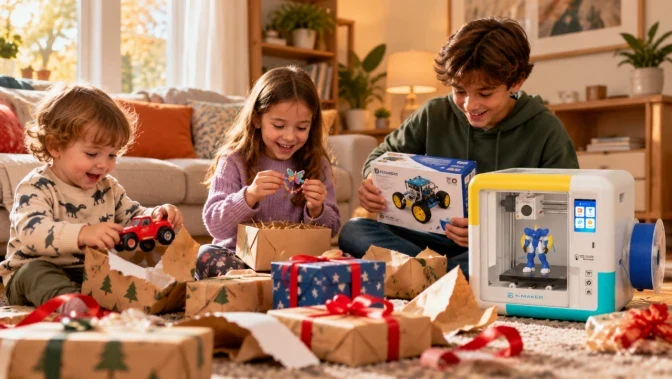
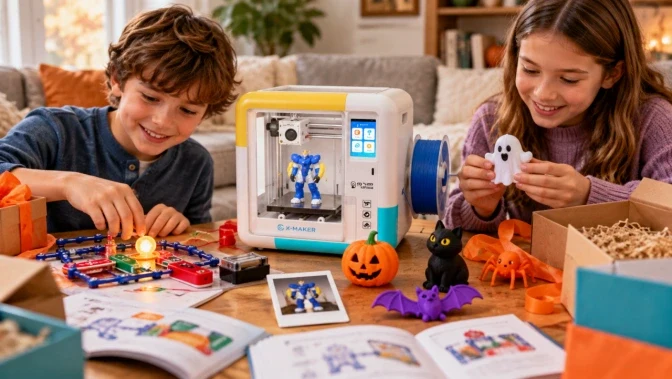
The AOSEED X-MAKER JOY, an enclosed kids’ 3D printer for ages 4 to 12, is a full FDM printer that works in PLA.
Kids choose a model in the AOSEED app, maybe add their name to it, and send it to the printer over WiFi. The JOY levels its own bed, so there’s no paper test to fiddle with.
Its build area is 120 mm on each side, a little under 5 inches. A keychain fits easily, and so does a figure about the size of a child’s palm.
You’ll still load new filament and pop finished prints off the magnetic plate yourself. First prints sometimes need a second try, which is normal on any printer, toy or not.

Six Things to Check Before You Buy a Toy Printer
• It runs on filament and a heated nozzle. Pens and molds don’t count.
• The box or product page lists build volume, supported materials, and print temperature.
• Hot parts sit behind a door or enclosure.
• Standard 1.75 mm PLA fits, or you know what the brand’s own filament costs.
• You can find a model library in the app, plus a way to open your own files later.
• Spare nozzles and build plates are sold, and there’s a warranty.
If you’re weighing a first printer against something bigger, you can compare X-MAKER JOY and X-MAKER feature by feature.
What We Tell Parents Who Ask About Toy 3D Printers
If it melts filament, it’s a real printer in a friendlier case. The nozzle gets just as hot. What changes is the range of plastics and how much the app decides for you, and for a child of six, that’s a good trade.
Start with what your child wants to make. Then think honestly about how much time you can sit next to the printer on a weekend. You can see what families print with AOSEED’s kids’ 3D printing platform.
FAQs
Is a toy 3D printer a real 3D printer?
Yes, as long as it uses filament and a heated nozzle. Kids’ FDM printers build objects layer by layer, just like the desktop printers hobbyists use. The differences are in the extras, like the app and the safety shell.
What makes a toy 3D printer different from a hobby printer?
The printing itself is identical. A toy printer usually sticks to PLA and prints smaller objects. Its settings live inside an app, and the hot parts sit behind a door. Hobby printers take more plastics and let you adjust everything.
Do toy 3D printers have hot nozzles?
Yes. To print PLA, the nozzle has to reach about 190 to 220°C. Kids’ models keep it behind a shell or door, but an adult should still remove prints and do any maintenance.
Are toy 3D printers accurate?
They’re accurate enough for toys and simple moving parts. A finished part can be off by up to about 0.2 mm, which is why pegs and holes are designed with a little extra room.
Will a toy 3D printer take normal PLA filament?
Some will and some won’t. Many accept any standard 1.75 mm spool. A few only run the brand’s own small rolls, which cost more per print.
How safe is a toy 3D printer for young kids?
It’s safe enough with an adult nearby. Pick an enclosed model and put it somewhere with fresh air. Keep small printed pieces away from anyone under 3.
Does a 3D pen count as a toy 3D printer?
No. A 3D pen works more like a hot glue gun, since you move it by hand and draw with warm plastic. A printer moves on its own and follows a digital model, so it can make the same part twice.
Why do so many toy 3D printers skip the heated bed?
They print PLA, and PLA sticks to an unheated plate well enough on its own. ABS is different. It usually needs a heated bed to keep its corners down, so a printer without one stays PLA only.




Further reading
12 3D Printed Fidget Toys Kids Can Print and Customize
Is a Toy 3D Printer a Real 3D Printer? What Parents Should Check
6 Best 3D Pens for Kids, and When to Upgrade to a 3D Printer