

3D Printed Cars Kids Can Design and Race: 9 Projects From Easy to Advanced
3D printed cars for kids can be as simple as a solid little coupe that finishes printing before lunch, or as involved as a remote control racer with a motor, a steering servo, and a body your child designed.
We’ve grouped nine car projects into three levels. Each one explains what your child gets to design, which parts move, and what to test once the car leaves the printer.
Before anything races, there’s a quick wheel and axle fit test, because a wheel that rubs will lose to a block of plastic. If you want to 3D print a car for kids at home, PLA is all you need for every project here.
From a Child’s Sketch to a Working Car
Back in 2014, at the Maker Faire in Tokyo, 11 children between 4 and 8 years old each drew a car from the side. Two designers who work for a big Japanese carmaker turned the drawings into 3D models, and every car came back printed with wheels that turned.
The kids colored their cars with markers, then pushed them down a track one at a time. In 3DPrint.com’s story on the workshop, one of the designers says every car drove without a problem, and the kids were thrilled to see their own designs move.
That workshop had an industrial printer and two professionals behind it. A home version is smaller and slower, but it works, especially with a parent helping on the wheels.
What Kids Need to 3D Print a Toy Car
You’ll need a printer that handles PLA, a car file or a drawing, something to use as axles, and a stretch of smooth floor. That’s about it.
|
STARTING WITHOUT A PRINTER? A car project is a pretty good excuse to get one. Our 3D printers for curious young makers are sized for exactly these little bodies and wheels. |
A Printer, PLA, and a Flat Track
Most filament printers can manage these cars as long as they print PLA cleanly. Ours, the X-MAKER JOY, our printer for ages 4 to 12, is enclosed and prints up to 120 mm in each direction, which is plenty for a toy car body and a set of wheels.

Grab a ruler too, plus a few metal rods or round sticks for axles. A long hallway makes the best test track in most houses.
A Car That Fits the Print Area
Search for 3D printed cars online and you’ll find replicas with dozens of parts. We’d skip those for now and look for models made for small printers. Check the size first, too, because shrinking a car with moving wheels also shrinks the gaps they need.
Level 1: Easy 3D Printed Cars for Beginners
These three are where we’d start. The first one teaches shape, and the next two add wheels that actually turn.
1. A Solid Mini Car to Decorate
It’s one solid piece with nothing to jam, and a small one usually finishes in 30 to 60 minutes. Kids end up making surprisingly specific choices, like a roof that sits low, chunky wheel arches, or the number 7 on the door because that’s how old they are.
We like printing it twice, with the second one a few millimeters wider. Side by side, the difference looks much bigger than it did on the screen, and that tends to stick with kids.
2. A Push Car With Real Wheels
The body and four wheels print as separate parts, and two axles hold it all together. Give the whole set an hour or two on the printer.

Then it’s floor time. Roll it along the same strip of hallway three or four times. If it keeps drifting to one side, a wheel is rubbing or an axle went in crooked, and working out which one is half the fun.
3. A Car Based on Your Child’s Drawing
This is the version of the Tokyo workshop you can run at the kitchen table. Your child draws a car from the side, and you help turn it into a body that can print.

The AOSEED design app has AI tools that turn a drawing into a printable design, which saves a lot of fiddling.
Expect a round of changes. A drawing rarely has flat sides or space for axles, so the first print tends to look a little different from the sketch, and comparing the two makes a good conversation.
Level 2: 3D Printed Cars With Moving Parts
Here the moving parts come straight from the printer, so the printer itself needs to be in good shape.
4. A Jeep With Wheels Printed in Place
Some jeep models print in one go with the wheels already sitting on their axles. Done right, the wheels spin the moment the print leaves the plate. Size decides the time, but one to three hours is typical.
The catch is the first layer. If it’s squashed too flat, plastic spreads into the gaps and the wheels fuse. Our guide to slicer settings for first layers and supports covers what to check.
5. A Racer With Swappable Wheels
This one keeps the same chassis and swaps between two sets of wheels, one small and one large, both with the same axle hole. Each set prints in roughly 30 to 60 minutes.
Roll it down a ramp with the small wheels, measure, then switch. Plenty of kids bet on the big wheels and lose, which leads straight to the question of why.

6. A Racer With Two Body Shells
The chassis and wheels stay the same while the body changes, with one tall, boxy shell and one low, flat one. Each shell takes about an hour.
Kids watch whether each version runs straight or tips on the way down, which is really a lesson about where the weight sits. We wouldn’t tell them a spoiler makes a toy car faster, though, because at these speeds it probably doesn’t.
Level 3: Advanced 3D Printed Race Cars
Now the cars move by themselves. The printed parts hold a balloon, a rubber band, or a motor, and our creation kits that turn prints into toys cover the pieces a printer can’t make.
7. A Balloon Car
A light printed chassis carries a balloon taped to a straw that points out the back. Let go, and the escaping air shoves the car forward. NASA uses the same action and reaction idea in its balloon rocket car activity.

To test it, blow the balloon up to a few different sizes, measured with a piece of string around the middle, and see how far each run goes. Younger kids should leave the balloon to an adult.
8. A Car Powered by a Rubber Band
This one runs on a rubber band looped around the back axle. Roll the car backward along the floor, and the band twists up. When your kid lets go of the car, the band unwinds and drives the wheels. All the parts take two or three hours to print.
Kids love counting the winds on this one. They can try five turns, then ten, then fifteen, writing down the distance each time, as long as the band isn’t stretched past what the design allows.
9. A Remote Control Racer With the X-RACER Kit
For kids who want real steering, we made the X-RACER kit. Its motor has a lot of pulling power, a 180° digital servo handles the steering, and everything fits onto the chassis modules that come in the box.

The body is your child’s part of the job. They design it, print it on whatever 3D printer you have at home, and fit it onto the chassis, and what comes out is a 3D printed race car that really steers.
The same parts can also become an SUV or a battle robot, and they work with pieces that fit LEGO bricks. The remote reaches 15 to 20 meters, which is more than the length of most hallways.
Our favorite challenge is a cone course down the hallway. Drive it with one body, swap in another, and see which one corners better.
Wheel and Axle Fit Test: Run It Before Any Race
Wheels need a little room. If the hole is too tight, the wheel drags, and if it’s too loose, the car wobbles down the track. It’s the same wheel and axle from the simple machines worksheet your kid may have brought home from school, only tiny.
We’d skip the guessing. Three wheels that are identical apart from the hole, slid one at a time onto the same 4.0 mm axle, will tell you more than any setting in the slicer.
Wheel A has a 4.2 mm hole, so there’s only 0.2 mm of room around the axle. On a lot of printers it drags, and a quick flick shows whether it keeps turning.
Wheel B gets a 4.4 mm hole, and on a printer that’s tuned well, that 0.4 mm gap is often the sweet spot. Wheel C, at 4.6 mm, spins freely, though it may wobble once the car picks up speed.

Don’t take those sizes as gospel. Every printer makes holes a hair smaller or bigger than the file says, so measure what actually came out, keep whichever wheel spun best without wobbling, and use that hole size on the whole car.
One thing trips people up. All of this assumes the axle stays put while the wheels spin around it. Some designs fix the wheels tight to the axle instead, and then the whole rod turns, so the loose fit belongs where the axle passes through the car body.
How to Hold a Fair Race With 3D Printed Cars
Build a Simple Track
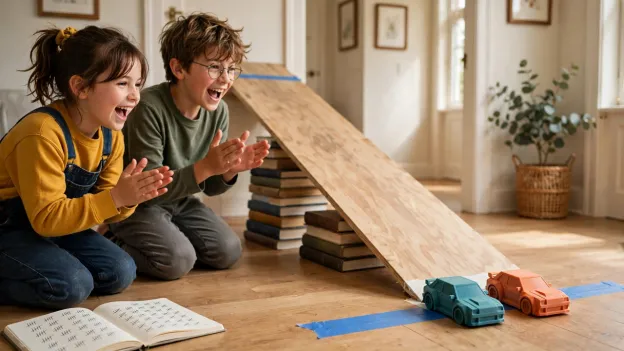
A smooth hallway works for push cars and RC cars. Gravity races need a slope, and a board propped on a few books does the job, with a strip of tape at the start and another at the finish.
Change One Thing at a Time
Swap the wheels or the body, never both at once, or nobody will know what made the difference. It’s the test and improve step of the engineering design process NASA teaches, done on a hallway floor.
Run Each Car Three Times
One run can be a fluke. We’d do three per car and write each result down. Keep the gravity cars and the powered cars in separate races, too, since a balloon car against a push car isn’t a fair fight.
Where to Find 3D Printed Car Files
The AOSEED app has thousands of models you can print as they are. Free libraries such as Printables, MakerWorld, and Thingiverse have plenty of simple cars too, and the ones with lots of photos from people who’ve printed them are usually the most reliable picks.
Check the size, the parts list, and the license before you hit print. Big paid kits, like the RC trucks 3D Sets builds at 1:8 scale, are brilliant later on but too much for a first car. Our list of 3D printing ideas for kids has easier starters.
Safety Tips for Kids Making 3D Printed Cars
Keep the Printer an Adult Job
The nozzle gets hot, so an adult loads filament and takes prints out once they’ve cooled. UL’s Chemical Insights researchers also suggest printing somewhere with good airflow.
Check Wheels and Small Parts
Wheels, axle caps, and snapped pieces are just the right size for a toddler’s mouth. CPSC small parts rules keep parts like these out of toys for children under 3, so we’d store car kits up high and throw away anything that cracks.
Take Care With Balloons and Powered Cars
The CPSC says uninflated or broken balloons are a choking risk for children under 8, which is why an adult should handle them. With RC cars, follow the kit’s charging instructions and keep races away from stairs, roads, and the family dog.
Final Thoughts on 3D Printed Cars for Kids
The best 3D printed cars for kids are the ones they get to change. A mini car is a good place to start, and after a few races most kids want bigger wheels, a different body, or a motor, which is the next project.
If the hallway races start getting serious, there’s more for the next build at AOSEED, where kids make their own toys.
FAQs
Can my kid 3D print a working car, or just a model?
Yes. A toy car with rolling wheels is a very doable home print, and a kit like ours adds the motor and steering. Real cars are a much bigger job, although carmakers already use printed parts, and GM says its Cadillac Celestiq has 115 of them.
What is the easiest 3D printed car for beginners?
The easiest one is a solid mini car, because there’s nothing in it that can jam. Once that works, a push car with separate wheels and two axles makes a good second project.
How do I make the wheels move on a 3D printed car?
Give each wheel a hole that’s a little bigger than the axle. When a wheel sticks anyway, the hole is usually too tight or plastic from the first layer is rubbing, so print a couple of spares with larger holes and keep the one that spins without wobbling.
Can kids design their own 3D printed cars from scratch?
Yes. Plenty of kids begin with a drawing, and others change the shape of a car someone else made. An adult usually steps in to make room for the axles.
What’s the best filament for 3D printed toy cars?
PLA is the one we’d use for nearly every kids’ car. It prints easily, holds its shape, and works on beginner printers, while tougher filaments are better left for advanced builds on printers that support them.
How long does it take to 3D print a toy car at home?
A small, solid car can be done in under an hour. Add a chassis and separate wheels, and you’re looking at a few hours. Our guide to typical print times for kids’ projects has more examples.
Can you make a 3D printed RC car at home?
Yes, but the printer can’t make the electronics. The X-RACER kit supplies the motor, the steering, and the remote, and your child prints the body and any extra pieces.
Where can I download free 3D printed car STL files?
Printables, MakerWorld, and Thingiverse all have free toy cars, and the AOSEED app has thousands of models. Before printing, it’s worth checking the size, the parts list, and the license.


Further reading

3D Printed Dollhouse Furniture Kids Can Make: 10 Projects With Sizes and Scale

Articulated 3D Printed Animals for Kids: 10 Prints That Move

Articulated 3D Printed Animals for Kids: 10 Prints That Move


