

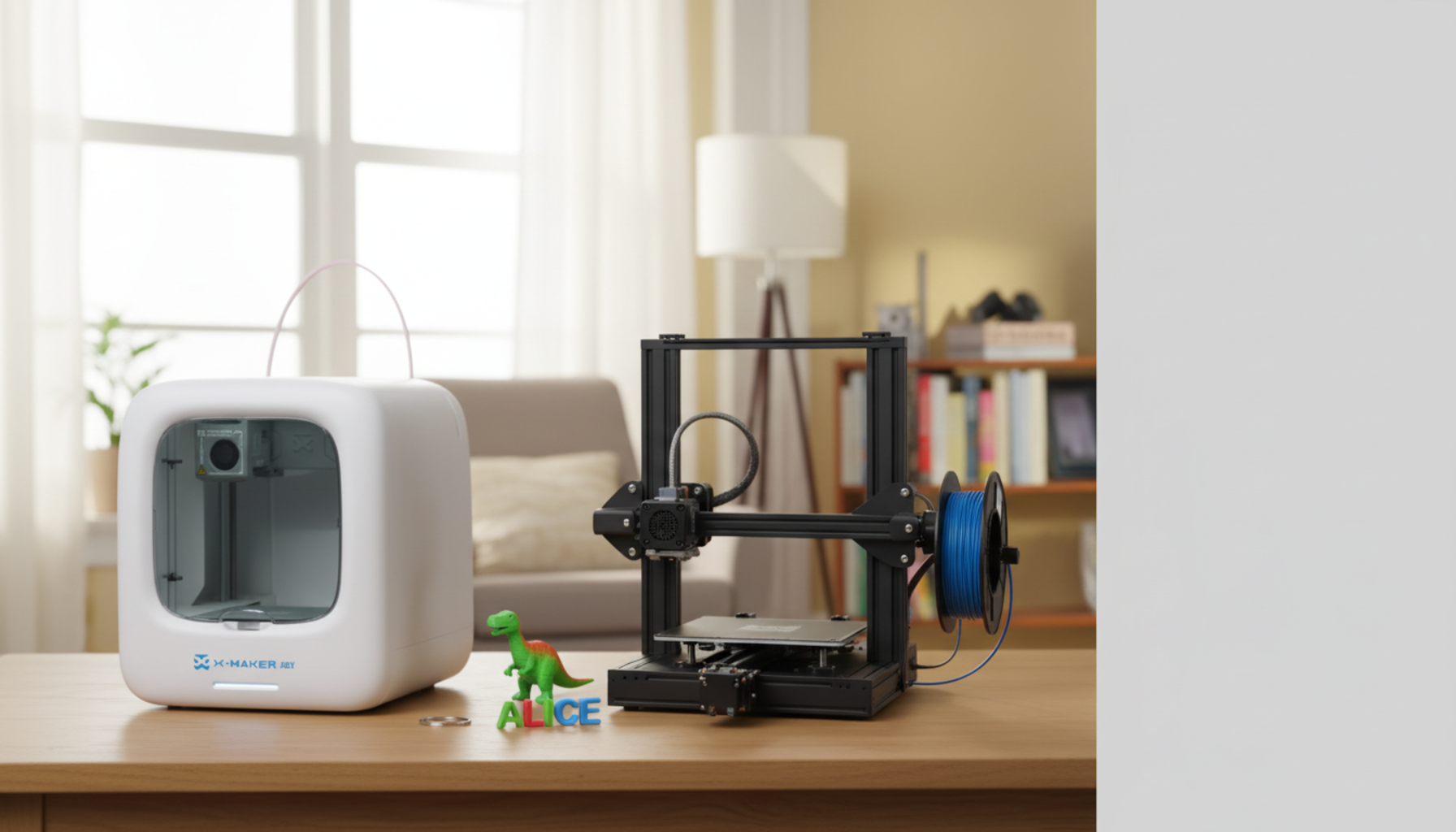
Open vs Enclosed 3D Printers for Kids: Parent Comparison
A nozzle at 220 to 260°C. A heated bed at 80°C. A six-year-old who just asked, "Can I help?"
That's the open-versus-enclosed decision in one snapshot. Walls and a door, or no walls and a full view of every moving part. The right answer depends on the child, the room, and what you actually plan to print.
This guide covers the safety math, the material question, age-by-age fit, the cost picture, and the small things that decide whether the printer still gets used in month four — not just week one.
Quick Parent Verdict: Open vs Enclosed 3D Printers for Kids
Two minutes of context. The full decision is below, but here's the short version.
For kids under 12 at home, enclosed wins almost every time. The walls keep curious fingers away from 220°C metal. The chamber improves print success. The same walls dampen the steady whine of stepper motors that makes long prints exhausting to share a room with.
Open-frame still earns its place — for a 13-or-older kid who already takes things apart for fun, with an adult around and a ventilated workspace. Budget matters too. A capable open-frame runs $200 to $500. A kid-friendly enclosed model starts near $350 and reaches $900+ once filters and door sensors show up on the spec sheet. Most families land here: enclosed in the $400 to $600 range, PLA filament, a bedroom or family room. Browse the AOSEED kids 3D printer lineup if you want to compare options side by side.
At-a-Glance Comparison
|
Factor |
Open-Frame |
Enclosed |
|
Best age fit |
13+ with supervision |
7–12 with adult setup |
|
Typical price |
$200–$500 |
$350–$900+ |
|
Hot parts |
All exposed |
Behind acrylic door |
|
Noise level |
Loud across long prints |
Notably quieter |
|
Fumes & particles |
Need open windows for ABS |
HEPA / carbon filter option |
|
Material range |
PLA, PETG, TPU |
All above + ABS, ASA, Nylon |
|
Repair access |
Direct, fast |
Panels need removal |
|
Print reliability |
Sensitive to room drafts |
Stable chamber temperature |
What Sets Open and Enclosed 3D Printers Apart

Both melt plastic. Both move a nozzle on three axes. Both lay down layers. The difference is environmental — walls or no walls — and that one difference ripples through everything else.
How Open-Frame Printers Work
The metal frame holds rails and motors. The print head moves across the bed in full view. Every belt, every fan, every screw sits within arm's reach. Most low-cost FDM printers ship this way because skipping the enclosure cuts cost, weight, and assembly time.
Cooling fans blow directly at the freshly laid plastic. Good news for PLA and PETG — they want a fast freeze. Bad news for ABS and ASA — they shrink as they cool, and uneven cooling means warped corners and split layers.
The visibility is a teaching feature for older kids. A teenager who watches the print head trace each line picks up bed leveling in a way no YouTube tutorial replicates.
How Enclosed Printers Work
Walls, a door, sometimes a filter. The chamber traps warm air around the print. The same wrapper that contains heat also dampens noise and keeps small hands outside the working area.
ABS that warps at room temperature prints flat at 45°C ambient. Stepper motor whine that fills a room drops to refrigerator-quiet behind acrylic. A door sensor pauses the print when someone opens it mid-job, then resumes when it closes.
Most kid-focused enclosed models add a touchscreen, an app-based model library, and at least one safety sensor. Features that compress the learning curve enough that the first print can happen on day one rather than week three.
The Safety Math for Kids

Buying for a child changes the math. The features you weigh shift, the failure modes you imagine shift, and the answers a single adult would accept stop applying.
Hot Nozzles and Heated Beds
Every FDM printer heats the nozzle between roughly 190°C and 260°C, depending on filament. The bed sits at 50–80°C for most materials. Both stay hot for several minutes after the print finishes. Skin contact at those temperatures causes a burn in under a second.
|
HEAT WARNING Nozzles run between 190°C and 260°C during printing. Heated beds often hold 60°C or higher and stay dangerously warm for several minutes after the print ends. The screen reading "idle" doesn't mean cool — check the temperature readout before letting a child near the bed. |
On enclosed machines, the door is the safety. A kid would have to deliberately open it to reach the nozzle. On open-frame machines, the safety is supervision — which works for an attentive 14-year-old and fails predictably for a curious 8-year-old. The cutoff most experienced parents use is age 10. Below 10, enclosed. Above 10, depends on the kid.
Moving Parts and Pinch Points
The print head moves at 60 to 150 mm/s during normal printing, and 300+ mm/s on speed-tuned models. Fast enough to startle. Fast enough to bruise.
Loose long hair, hoodie strings, small fingers — the realistic hazards. Belts and gears spin continuously through every print. Enclosed printers block access to all of it behind a panel. Open-frame printers handle the same risk through "no reaching into the printer while it runs," a rule that requires an adult to enforce.
Fumes, Particles, and Ventilation
PLA prints with a faint, mostly sweet smell. ABS prints sharper. The particles matter more than the smell. NIH peer-reviewed research on FDM emissions has measured average particle concentrations of around 300,980 particles/cm³ for ABS versus 65,482 particles/cm³ for PLA — roughly a 4.5× difference. CDC/NIOSH Approaches to Safe 3D Printing identifies ultrafine particle and VOC emissions as a documented hazard during printing, with rates varying widely between materials.
Enclosed printers with HEPA or activated carbon filters contain most of those emissions. Washington State Department of Health guidance on 3D printers in schools puts the recommendation plainly: "Select a fully enclosed printer for protection from particulate, chemical, and physical hazards." Open-frame machines in ventilated workshops handle it through airflow. Open-frame in a closed bedroom is the setup to avoid regardless of which model you bought.
Door Sensors and Auto-Pause
Door sensors are small but useful. Kid-friendly enclosed printers often pause the head and retract filament when the door opens, then resume when it closes. Some models go further — locking the door during heated phases or requiring a passcode to start a job.
None of this replaces an adult in the room. All of it lowers the chance of an accident when an adult turns their head.
Print Quality and Material Differences
Print quality is mostly about temperature, and temperature is mostly about whether the machine has walls.

PLA and PETG for Beginners
PLA is the right starting material for almost every kid. Lower temperatures (190–220°C), good adhesion to most plates without glue, mild sweet smell rather than harsh chemical. A bad PLA print on an open-frame is usually still a usable PLA print.
PETG is the step up — stronger, water-resistant, slightly stringier, slightly slower. Both PLA and PETG run happily on open-frame machines. Both work just as well inside an enclosure as long as the chamber isn't too warm. PLA softens above about 50°C ambient.
Why ABS Needs an Enclosure
ABS shrinks as it cools. In a 22°C room with no chamber, the bottom of the print stays warm while the top cools and contracts. The result: corners that lift off the bed and layers that split. "Warping," in printer slang.
A chamber held at 45–60°C keeps the entire print warm enough to cool uniformly. ABS also releases more odor and particle matter than PLA. The same chamber that prevents warping gives a filter something to filter. Both problems get the same fix.
The failed-print tax of open vs enclosed printers
The real cost of an open-frame machine for a kid isn't the price tag. It's the failed prints. A four-hour print that fails at hour three because someone opened a window still consumed four hours of filament, electricity, and patience. Science fair models that fail the night before are a hard lesson in printer choice.
Enclosed machines cut the failure rate sharply for ABS and noticeably for PLA on long jobs. For a kid who tries one big project a month, the difference between three finished projects a year and ten matters more than the price gap between machines.
Age-Based Buying Guide for Parents
Match the printer to maturity and attention span, not to the marketing label on the box. A printer that works for a 15-year-old often fails a second grader. Goes the other way too — a guided-app printer can feel insulting to a teenager who wants to fiddle with slicer settings.
Ages 7 to 9
At this age, the printer is a parent-operated tool the child helps with. The child picks the model from the app, chooses the color, watches the print, helps remove the finished piece once the bed has cooled. The parent loads filament, levels the bed if the machine doesn't do it automatically, stays in the room during prints.

Enclosed is non-negotiable here. A beginner-friendly 3D printer for kids with a closed chamber, a friendly touchscreen, and a guided app gives the child enough autonomy to feel ownership without giving them access to anything that can burn. Stick to PLA. Print toys, name tags, custom Lego-compatible blocks, dinosaur puzzles. Save engineering projects for later.
Ages 10 to 12
The bridge age. Some 11-year-olds can operate an open-frame machine carefully under supervision. Others still need the door. The right call depends on the kid, not the calendar.
Auto bed leveling, a touchscreen the child can navigate alone, a print library aimed at their age group. STEM-inclined preteens often graduate to simple design tools at this stage — Tinkercad first, then more capable apps. The printer should grow with that curve rather than block it.
Ages 13 and Up

By 13, most kids can handle the workflow themselves. Filament changes, bed cleaning, slicer settings, basic troubleshooting — all reasonable expectations. The AOSEED X-MAKER for older kids and teens sits between the beginner-toy category and the open-frame hobbyist world. Enclosed for safety and reliability, but with the build volume and material range a teenager actually needs for STEM projects.
Open-frame becomes defensible at this age too, especially for teens who want to learn the machine itself. The decision comes down to what the kid wants to learn — making things, or making the machine.
Cost, Setup, and Maintenance
Price is the first filter most families apply. Long-term cost matters more.
Open-Frame Printer Costs
A respectable open-frame FDM printer sits in the $200–$500 range. Under $200 starts running into bed-leveling and frame-rigidity problems that fail prints rather than teach skills. Over $500 pays for features (faster motion, dual extrusion) most kids won't use in the first year.
Replacement parts are easy. Nozzles, build plates, belts, hotends, fans — a few dollars each on third-party sites. Repair videos exist for nearly every popular open-frame machine.
Enclosed Printer Costs
Entry-level enclosed kid-focused printers start near $350. The next tier ($500–$700) adds touchscreens, app integration, and quieter electronics. The premium tier ($800–$1,200+) adds HEPA filtration, integrated cameras, and faster print speeds.
A reasonable middle-ground budget for an under-12 user: $400–$600. Enclosed chamber, friendly app, automatic leveling, at least one safety sensor — enough to make day-one ownership uneventful.
Maintenance and Repairs
Open-frame: nozzle clogs and bed adhesion are the two regular issues. Both have ten-minute fixes. Filament changes take about a minute.
Enclosed: same issues, slightly more access time because panels block direct reach. Filter replacement is the new chore — HEPA or carbon cartridges typically need swapping every 6 to 12 months. Cartridges run $15–$40 each.
Which Printer Type Should Parents Choose?

The choice usually comes down to where the printer lives, who uses it, and how often an adult is in the room. Three honest answers and the right machine sorts itself.
Choose an Open-Frame Printer If
- Your child is 13 or older and wants to learn the mechanics, not just use them
- You print mostly PLA and PETG
- Budget is the binding constraint
- The printer will live in a ventilated workshop, garage, or basement
- You're comfortable supervising every print
Choose an Enclosed Printer If
- Your child is under 12
- The printer will live in a bedroom, classroom, or shared family space
- Quiet operation matters
- You plan to print ABS, ASA, or Nylon now or later
- You want the option to leave the room during a print
Best Overall Pick for Most Kids
|
THE ENCLOSED-FIRST CASE For a family buying their first 3D printer for a child, an enclosed model in the $400–$600 range covers more failure modes than any other choice. Safety, noise, print reliability, and material flexibility — one purchase handles all four. Open-frame stays the right answer for the specific case of a mechanically curious teenager in a workshop. |
The reason enclosed wins for most families isn't any single feature. It's the cumulative effect of removing the small daily worries that wear down ownership — the worry about a curious sibling, the worry about overnight noise, the worry about a six-hour print failing because someone opened a window. Each is small. Together they decide whether the printer still gets used in month four.
Conclusion
The open-versus-enclosed debate looks technical from the outside. For a family, it's mostly a question about the household. Where will the printer live? Who will use it? How often will an adult be in the room? Answer those three honestly and the right machine sorts itself.
Under-12 kids: enclosed is the high-confidence choice. Walls remove burn risk. Door sensors remove curiosity risk. The chamber improves print success. Noise reduction makes the machine livable in shared space.
Teens: the decision opens up. Teens who want to learn engineering benefit from open-frame's visible mechanics. Teens who want to make things benefit from enclosed reliability. Either is defensible at that age.
PLA remains the right first filament regardless of machine. Build confidence there, add new materials once the basic workflow feels natural. Bedroom ventilation matters more than most parents expect — a cracked window during long prints is a habit worth forming early. AOSEED's family creativity platform, used in over 5,000 schools across 30+ countries, is built around exactly that idea — a printer that fits a family routine, not the other way around.
FAQs
Is it better to have an open or closed 3D printer?
For kids under 12, closed almost always wins — the walls handle hot parts, noise, and most print failures in one purchase. Open-frame fits teens learning the machine itself with an adult around.
What is the most kid-friendly 3D printer?
An enclosed FDM machine in the $400–$600 range with auto bed leveling, a touchscreen, an app-based model library, and PLA support. App quality matters more than any single hardware spec for younger users.
Should a 7-year-old have a 3D printer?
Yes — with an adult driving the workflow. The child picks models and watches; the adult handles loading, slicing, and removal. Enclosed only at this age.
What are the advantages of an enclosed 3D printer?
Hot parts behind a door, quieter operation, stable print temperatures, less particle leakage with a filter, and door sensors that auto-pause when opened. Four big wins in one purchase.
Is an enclosed 3D printer safer?
Yes. The chamber removes accidental contact with 220°C parts, and HEPA/carbon filters reduce particle exposure. Neither replaces adult supervision, but both lower day-to-day risk meaningfully.
For kids and home use, PLA is almost always the best first choice
PLA, by a wide margin. Lower temperatures, less odor, fewer ultrafine particles (~4.5× less than ABS in peer-reviewed measurements), and forgiving first-layer behavior on most beds.
What to look for in a 3D printer for kids?
Enclosed chamber, auto-pause door sensor, auto bed leveling, simple touchscreen, PLA support, a quiet stepper driver tier, and active app/model-library support in your country.
Do enclosed printers need ventilation?
Yes, just less. The chamber holds most particles during the print, but air still exits through fan vents. Cracking a window during long prints handles the rest.
Are open-frame printers bad for kids?
Not at all — they're the right pick for teens learning machine mechanics with adult supervision and a ventilated room. The mismatch is open-frame plus under-10 plus closed bedroom.
Is PLA safe for kids?
PLA is the most kid-friendly filament — lower print temperatures, less particle emission, and a mild sweet smell. Still melted plastic, so cracked-window ventilation matters. For a deeper look at materials and home use, see our full 3D printing safety guide for families.
Sources
- Washington State Department of Health, 3D Printers in Schools.
- Mayo Clinic, Burns: First aid.
- Cleveland Clinic Health Library, Burns: Symptoms, Degrees, How to Treat & Healing.
- NIH / PubMed Central, 3D Printer Particle Emissions:
- NIH / PubMed Central, Reducing particulate emissions from 3D printers.



Further reading

Graduation Gifts for Kids: Keepsakes for Kindergarten to Fifth Grade

How to Clean a 3D Printer: A Routine for Families

3D Printer Filament Holder: Options, Setup and a Version You Can Print


