

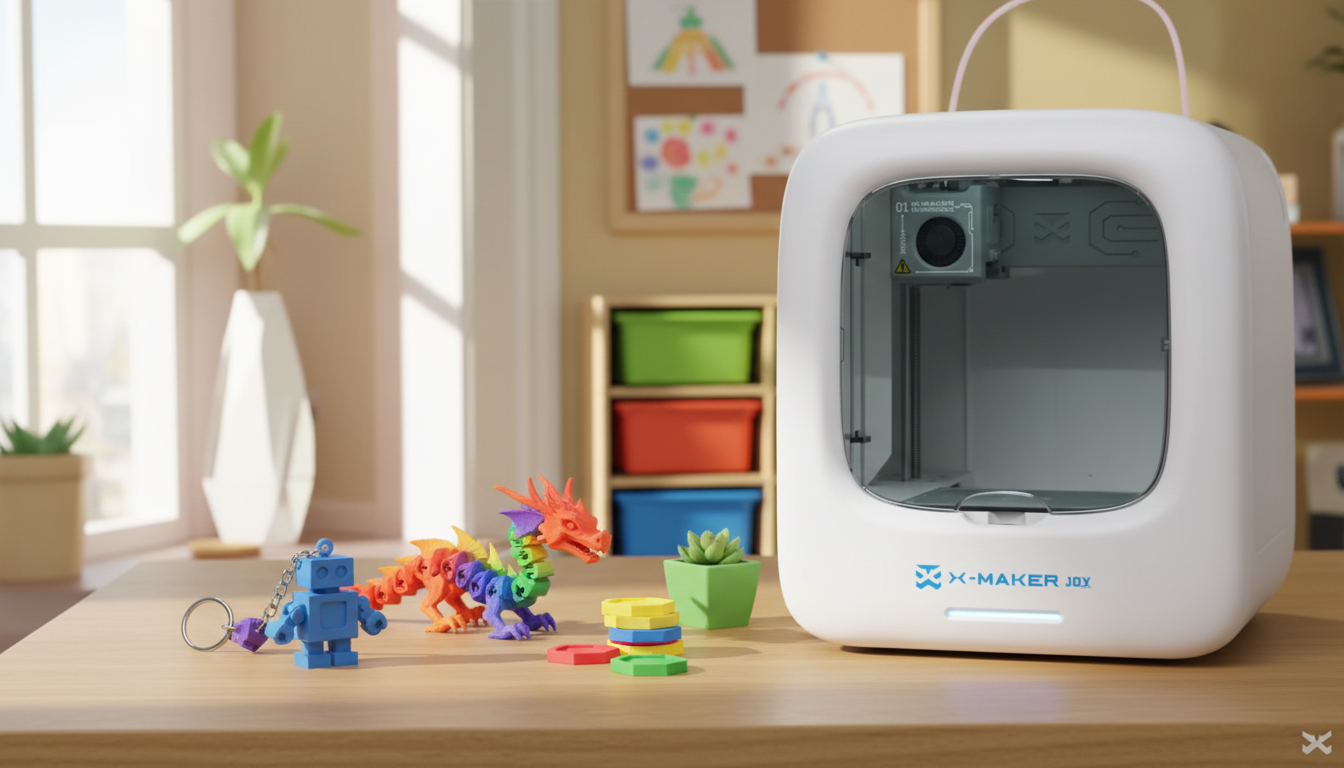
30-Minute, 60-Minute, and Weekend 3D Printing Projects for Kids
The first print matters more than most people realize. Too long, too complicated, or too many failed layers — and the printer collects dust for weeks. This guide skips the guesswork. Projects are organized by time, not difficulty. Pick the bracket that fits the afternoon you have. Build confidence before building dragons.
Most guides dump a list of models. This one shows you how long each project actually takes, what skill it builds, and what to do when it does not work. Start at the top if today is your first print. Jump to the weekend section if you have done a few already.
|
Quick 3D printing project for kids Under 30 min → keychain, bookmark, cable clip — flat, fast, no supports. 30–60 min → fidget toy, mini planter, game piece — one setup, still finishes the same day. Weekend → flexi animal, chess set, dinosaur skeleton — quick 3D printing projects for kids that feel worth displaying |
At a Glance: Projects by Print Time
|
Project |
Print Time |
Best Age |
Skill Built |
|
Keychain / bag tag |
20–35 min |
6+ |
Confidence, color choice |
|
Bookmark / page tab |
20–30 min |
6+ |
Personalization |
|
Cable clip |
15–25 min |
8+ |
Functional problem-solving |
|
Fidget toy / snap puzzle |
40–55 min |
7+ |
Patience, spatial reasoning |
|
Mini planter / organizer |
40–55 min |
7+ |
Design thinking |
|
Dice / game pieces |
30–50 min |
8+ |
Settings calibration |
|
Articulated animal / dragon |
2–3 hrs |
8+ |
Mechanics, patience |
|
Custom chess set |
Multi-session |
10+ |
Design, strategy |
|
Dinosaur skeleton / automata |
Full weekend |
9+ |
Assembly, engineering |
Quick 3D Printing Projects for Kids in 30–60 Minutes

Short projects build the habit. A child who holds a finished keychain 20 minutes after pressing print will ask to print again. Every project below is flat, support-free, and designed to succeed on the first attempt — which is what turns a curious kid into a repeat maker.
Keychains and Bag Tags
No project onboards a child faster. Initials, a simple star, a paw print — anything flat prints in 20–35 minutes on standard settings. Let the child pick the color before loading the file. That single choice gives them ownership of the result before it is even finished. Browse flat single-layer designs on Printables and filter by the toy and games category. Anything support-free and under 5mm tall will print cleanly the first time.
Cable Clips and Cord Organizers
A cable clip that keeps the charger from falling off the desk sounds dull. Kids find it oddly satisfying. The feedback loop is the reason — choose a cord width, pick a clip design, print in 15–20 minutes, snap it on, test it. Something works because they decided it should. That feeling is different from playing with a toy someone else designed, and it sticks.
Bookmarks and Page Markers
Flat objects are the most reliable beginner prints because they eliminate nearly every variable. A geometric bookmark or animal-shaped page tab finishes in under 30 minutes with no post-processing. Readers use these immediately, which means the project feels purposeful rather than decorative. Ask what shape or animal the child wants before loading the file — that conversation is part of the project.
30–60-Minute 3D Printing Projects for Kids

After one quick win, slightly longer projects open up. The 30–60 minute window is where children start experimenting rather than just following instructions — different infill, different color, different result. The printer becomes a tool instead of a curiosity.
Fidget Toys and Snap-Together Puzzles
Print-in-place fidget models come off the bed as a single moving object — no glue, no assembly, no small pieces to track down. A snap-together worm or infinity cube prints in 40–55 minutes and works the moment it cools. These are consistently among the most-recommended beginner prints in the r/3Dprinting community, and the reason is simple — the 'it just works' moment never stops landing well.
Mini Planters and Desk Organizers
A succulent pot or a pencil holder shaped like a robot finishes in about 45 minutes and earns a permanent spot on a desk. That visibility matters. Every time a child looks at it, they remember they made it — which is worth more than five forgotten toys in a drawer. Ask what shape, theme, or character before starting. The answer shapes the design decision and the result.
Dice, Game Pieces, and Mini Tokens
A replacement board game pawn or a custom D&D token prints in 30–50 minutes and goes straight into use. These are also the best calibration experiments — adjust infill or print speed, then hold two dice side by side and feel the difference in weight. One variable, one change, observe the result. That habit is the foundation of every maker skill worth having.
Weekend 3D Printing Projects for Kids

Weekend builds earn a different kind of satisfaction. A print that takes three hours becomes the toy that gets shown to every visitor. For families who want fewer hurdles between idea and finished print, a guided toy-making starter printer for families with an app-curated Toy Library means no hour-long search across disconnected platforms — ready-made, tested models organized by age and interest, updated weekly.
|
WHEN A KID IS THE MAIN 3D PRINTER USER A child does not want a maintenance session or a file-search session. They want to design something, watch it build, and play with what comes out. Open-frame budget kits tend to end with a parent troubleshooting on a Saturday. The AOSEED X-MAKER JOY starts at around $299, ships with 1,500+ ready-to-print models, and is built for ages 4–12. For families choosing a first printer, the kid-friendly 3D printer lineup makes it easier to match the machine to the child’s age, skill level, and support needs. |
Articulated Animals and Flexi Dragons
A flexi dragon or octopus prints every joint as part of the model — no hardware, no glue, no assembly step that small hands find frustrating. The toy bends, poses, and holds its shape. Print times run 2–3 hours depending on size and layer height. Choose a model labeled 'no supports' for a first weekend attempt. The Flexi Rex and Flexi Octopus are the two most-printed designs in this category and both print reliably in standard PLA.
Custom Chess Sets and Board Games
Print chess pieces that look like characters from a favorite story. Each piece takes 30–60 minutes, so a full set runs across an afternoon with natural stopping points. The child decides which character becomes the king — that decision matters to them. Free themed sets are widely available on Thingiverse. Filter for single-piece, support-free models if this is an early weekend project.
Dinosaur Skeletons and Automata
A dinosaur skeleton that prints bone by bone and assembles like a fossil dig connects directly to school science content. Kids assemble pelvis to femur to tibia and understand, visually, how the structure works — more durably than any worksheet. Automata go further: a T-Rex that opens its jaw when a crank turns, a penguin that walks on its own. These are full-weekend builds that stay on shelves for years.
Tips for Successful Prints

Most print failures come from three things: wrong filament choice, layer height set too low for the speed used, and a first layer that was never checked. Get these right and every project in this guide prints cleanly on the first attempt.
Choosing the Right Filament
|
Filament |
Best For |
Watch Out For |
|
PLA |
Almost everything on this list |
Brittle under hard impact — avoid for rough-play toys |
|
ABS |
Toys that get dropped, thrown, or sat on |
Needs ventilation; warps without an enclosure |
|
TPU |
Flexi animals and fidget toys — anything that should bend |
Requires slow print speed; strings if rushed |
|
PETG |
Multi-color builds where surface finish matters |
Sticks aggressively to glass — use a release agent |
Default to PLA. It prints at low temperature, comes in a wide color range, and is the most forgiving material for beginners. Once a child has five or six clean PLA prints done, they have the patience to try TPU for a flexi animal.
Slicing Settings and Print Speed

Two settings cause most beginner failures: layer height and speed. Start at 0.2mm layer height and 15–20% infill for quick prints. For anything with moving joints, drop speed — a flexi dragon at 60mm/s moves far more cleanly than one rushed at 100mm/s. The time difference is 15 minutes; the quality difference is obvious. Change one setting per test print, then compare the results side by side. That habit is worth more than any present.
Safety and Supervision

|
Two moments that need adult eyes: When the print starts — check bed adhesion and first-layer quality. When it ends — remove the object from a still-warm build plate safely. FDM nozzles reach 180–220°C. An enclosed printer with a locked door handles the in-between without constant supervision. |
At 6–7, the child's job at the printer is picking the model and pressing start. Slicer setup stays with the adult. At 9–10, most kids can handle basic slicing with guidance and troubleshoot simple adhesion issues on their own. That progression is natural — do not rush it, do not hold it back. AOSEED's toy-creation ecosystem provides guided design apps and AI-assisted creation tools that shift more of the workflow into the child's hands at exactly the right pace.
Maintenance Schedule to Keep Prints Running
|
How Often |
Task |
|
After every print |
30-second brass brush wipe on the nozzle tip while still warm |
|
Every material change |
Purge 100–200 mm of new filament before starting the print |
|
Every 20–50 print hours |
Cold pull — even if flow looks clean |
|
Quarterly |
Check hotend fan, extruder gear, and nozzle condition. Replace nozzle if worn. |
Conclusion
The time bracket determines the experience. Twenty minutes produces confidence. An hour produces something to show a friend. A full weekend produces the kind of thing that ends up on a shelf instead of in a toy bin — and stays there.
The pattern that keeps kids coming back is not complicated: small success, slightly harder project, repeat. Start with a keychain. Follow with a fidget toy. Plan a flexi dragon for the weekend after that. Each print quietly builds the patience the next one needs — without anyone having to explain that that's what's happening.
There will be a failed print somewhere in that sequence. A layer that peels, a piece that warps, an afternoon that ends without a finished object. That is not a setback. It is the moment a child learns that making things is a process, not a button. Some of the best 3D printing sessions start with something that did not work.
The other thing nobody tells you before you set one of these up: the child will start designing things nobody asked for. A custom holder for a specific toy. A replacement part for something that broke. A gift for a grandparent that cost thirty cents of filament and two hours of actual thought. That shift — from printing other people's models to solving real problems — happens faster than most parents expect.
For families who want fewer obstacles between an idea and a finished object, the kid-friendly 3D printer lineup includes enclosed, app-guided machines. A weekly updated model library helps kids spend more time making things and less time fixing printer problems.
FAQs
What is the quickest thing to 3D print?
A flat keychain or bookmark prints in 15–25 minutes with no supports. Choose a single-layer, support-free design and set layer height to 0.2mm. On a calibrated bed it almost never fails.
What can you print on a 3D printer for kids?
Toys, keychains, game pieces, figurines, desk organizers, bookmarks, mini planters, and cable clips — all beginner-friendly with standard PLA. Start with flat or single-piece models, then scale up once the habit is set.
What are some easy 3D printing projects?
Flat bookmarks, cable clips, keychains, and coin holders are the easiest — short print time, no supports, no assembly. After two or three of these, snap-together fidget toys are the natural next step.
What can a 10-year-old do with a 3D printer?
A 10-year-old can browse models, load filament, slice files, and start prints independently. Most can also troubleshoot basic adhesion issues with guidance. Custom game pieces and articulated animals are strong age-appropriate choices.
Can I legally sell 3D prints?
Yes, if the model license allows it. Original designs or open commercial-license models are safe to sell. Check the license on every model page before printing anything for sale.
Why is my 3D print failing?
Start with bed adhesion — clean the surface and check the nozzle gap. If that is fine, confirm the temperature matches the filament spec. Change one setting per test print until the issue clears.
Should a 7-year-old have a 3D printer?
Yes, with an adult present and an enclosed machine. At 7 the child picks the design and color while an adult handles setup. Keep early prints under 30 minutes so the session ends with a finished result in hand.
Is it legal to 3D print Legos?
Printing exact Lego brick replicas likely infringes on active design patents. Designing original interlocking blocks with different proportions is legal — and teaches more useful skills than copying existing bricks.
Sources
- Printable, Toys & Games — 3D Printed Models for Kids
- Reddit, r/3Dprinting, What Do You Suggest as a Fun Quick Print for Kids?
- MatterHackers, How to Succeed When Printing with PLA
- Autodesk Tinkercad, Getting Started with 3D Design
- Thingiverse, Free 3D Model Library


Further reading

Graduation Gifts for Kids: Keepsakes for Kindergarten to Fifth Grade

How to Clean a 3D Printer: A Routine for Families

3D Printer Filament Holder: Options, Setup and a Version You Can Print


