

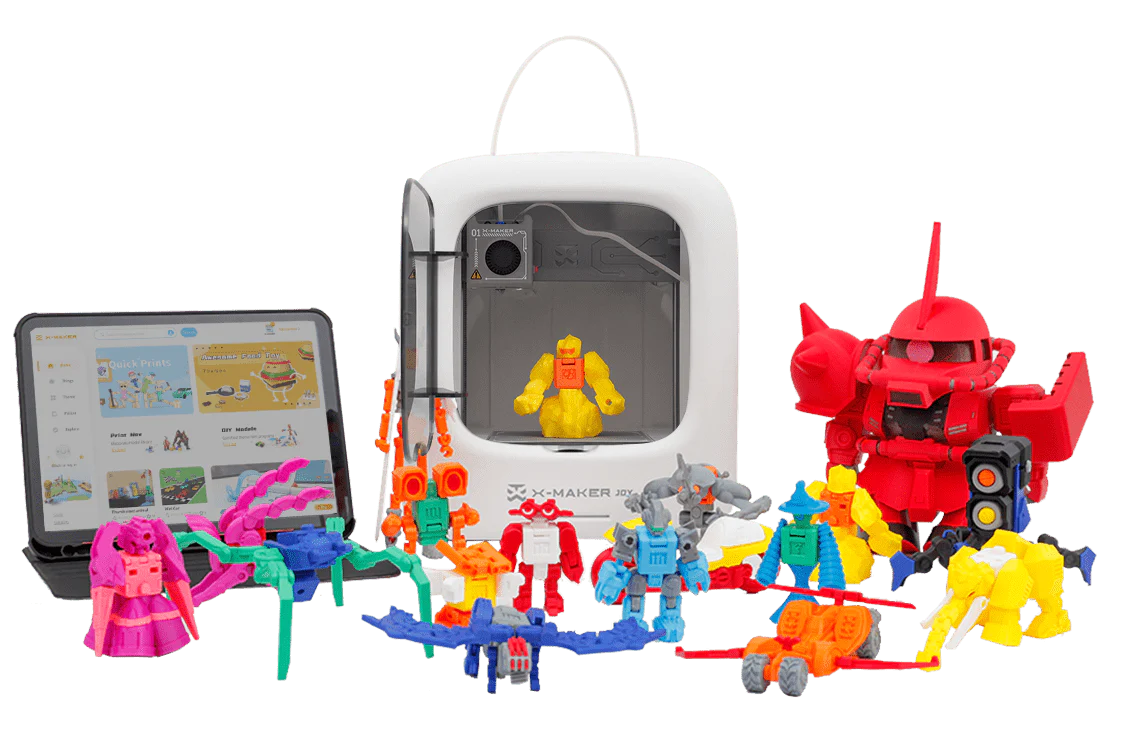
X-MAKER JOY vs X-MAKER: Which AOSEED Printer Fits Your Child Best?
A parent in our local Facebook group posted a simple question last month: 'We have a 7-year-old and a 12-year-old. Which AOSEED should we get?' Within an hour, there were 23 replies, roughly split down the middle.
That split tells you something useful. Both printers are good. They're just good for different children at different stages. And choosing the wrong one — giving the X-MAKER to a 6-year-old who gets frustrated with complexity, or giving the JOY to a 14-year-old who wants real creative control — is how a perfectly decent printer ends up on a shelf.
This comparison covers what actually matters: age fit, how the apps work day-to-day, what each printer can make, and which choice makes more sense for your specific child. The AOSEED X-MAKER JOY and the AOSEED X-MAKER share a lot of DNA — same safety philosophy, same ecosystem — but they're built for genuinely different users.
Key Differences Between X-MAKER JOY and X-MAKER

Age Range and Who Each Printer Is Actually Built For
The age ranges on the box are a real guide here, not marketing padding. The X-MAKER JOY lists ages 4-12. That's a wide span, but what it really means is: this printer is optimized for children who want to pick a toy, press print, and watch it appear. The workflow is stripped down on purpose. A 6-year-old can browse pre-loaded models in the app and start a print without asking a parent for help. The simplicity is the feature.
The X-MAKER lists ages 9-16. That range tells you something different. A 9-year-old using the X-MAKER will get more out of it than a 9-year-old using the JOY, provided they want to do more—custom designs, bigger builds, STEM projects. The X-MAKER's added screen and tools aren't complexity for its own sake. They're what make the printer relevant as a child's skills grow.
Design and Build: What's Actually Different
Both models are fully enclosed — that's non-negotiable for AOSEED across the whole range. The hot end, moving parts, and build plate are all inside a closed chamber. Neither printer has exposed components that children can accidentally touch during a print.
Beyond that shared baseline, the builds diverge. The JOY is compact and lightweight, making it easy to move — a child can set it up on a kitchen table for a project and put it away afterward. It includes a built-in camera so children can watch their print via the app and save time-lapse videos of the process. Younger children absolutely love this feature.
The X-MAKER has a 3.5-inch touchscreen on the machine itself. This means a child can interact directly with the printer rather than going through the app for everything. It has a slightly larger footprint to accommodate the bigger 150x150x150mm build volume. The extra size means bigger single-part prints and multi-component builds that simply won't fit on the JOY's 120x120x120mm bed.
Comparing Features: X-MAKER JOY vs X-MAKER

Full Specification Comparison
|
Feature |
X-MAKER JOY |
X-MAKER |
|
Target Age Range |
4 – 12 |
9 – 16 |
|
Build Volume |
120 x 120 x 120 mm |
150 x 150 x 150 mm |
|
Touchscreen on Printer |
No — app only |
Yes — 3.5-inch |
|
Built-in Camera |
Yes — timelapse |
— |
|
Standard Filament |
PLA (optimized) |
PLA, PETG, ABS |
|
Max Print Speed |
300 mm/s |
300 mm/s |
|
Layer Resolution |
0.1 – 0.4 mm |
0.05 – 0.4 mm |
|
Connectivity |
WiFi + USB |
WiFi + USB |
|
AI Design Tools |
AI MiniMe, AI Doodle |
AI-assisted tools |
|
One-Press Printing |
Yes |
Yes |
|
Fully Enclosed |
Yes |
Yes |
|
Door Safety Sensor |
Yes |
Yes |
|
Toy Library Access |
Yes — thousands |
Yes — thousands |
|
Creation Kits Support |
Yes |
Yes |
|
Passcode Lock |
Yes |
Yes |
|
Price (approx.) |
$249 (was $339) |
$369 (was $509) |
Print Quality and Material Options
Both printers deliver clean, consistent results right out of the box. For toy printing — figures, vehicles, puzzles, keychains — the JOY's output is excellent. You won't notice a quality gap on these kinds of projects.
Where the X-MAKER pulls ahead is precision and material range. Its minimum layer resolution of 0.05mm is professional-grade, which matters when a child is printing parts that need to fit together accurately — gears in a mechanism, pieces in a building kit, components for a science fair project. On those builds, the extra precision is genuinely noticeable.
The difference in material compatibility is also real for older users. PLA is the right choice for most family use — eco-friendly, non-toxic, easy to work with. But PETG is significantly stronger and handles heat better, which is useful for outdoor or load-bearing applications. ABS goes further still. The X-MAKER supports all three. The JOY is optimized for PLA, which is the right call for its target age range.
The App Experience: Where Kids Spend Most of Their Time
Both printers use the same AOSEED app. Same library, same design tools, same one-press printing workflow. The experience is genuinely good on both models.
The difference is what the X-MAKER adds on top. Its 3.5-inch touchscreen lets a child browse the library, adjust settings, and start or pause a print directly on the machine without picking up a phone. For an older child who wants to feel more in control of the process — who's printing for school and doesn't want to keep asking for the family tablet — that independence matters.
On the JOY, the app is the entire interface. This is actually a positive for younger children. It means the printer itself has no buttons to accidentally press. A parent hands over the tablet, the child browses and taps print, and that's it. The simplicity is very deliberate.
The AOSEED Toy Library — accessible through both models — holds thousands of models, with new additions weekly. This is the feature that keeps the printer part of regular family life rather than a one-month novelty. Animals, vehicles, seasonal builds, puzzles, robots, and custom gifts. There's always something new to find.
Which Printer Is Better for STEM Learning?

Both models deliver genuine STEM value, but in different ways and at different levels of depth.
Educational Tools and What Kids Actually Do
On the JOY, STEM learning happens through doing. A 7-year-old designing their first whistle or a working ring mechanism is learning about tolerances, materials, and cause-and-effect — they just don't know they're learning those things. The themed mini apps in the AOSEED ecosystem guide children through design challenges in a game-style format. It's structured enough to be productive and playful enough not to feel like schoolwork.
The X-MAKER adds layers. Older children can move from using pre-loaded templates to importing their own STL files designed in free CAD software. They can experiment with different layer heights to see how it affects print time and surface quality. They can try PETG for a part that needs to survive outdoor conditions. These aren't just printer settings — they're practical material science, experimentation, and problem-solving.
For a child preparing for a science fair, a STEM club project, or just someone whose questions are getting more sophisticated, the X-MAKER stays relevant in ways the JOY doesn't.
Customization and Creative Freedom
This is where the two printers diverge most clearly in terms of long-term value.
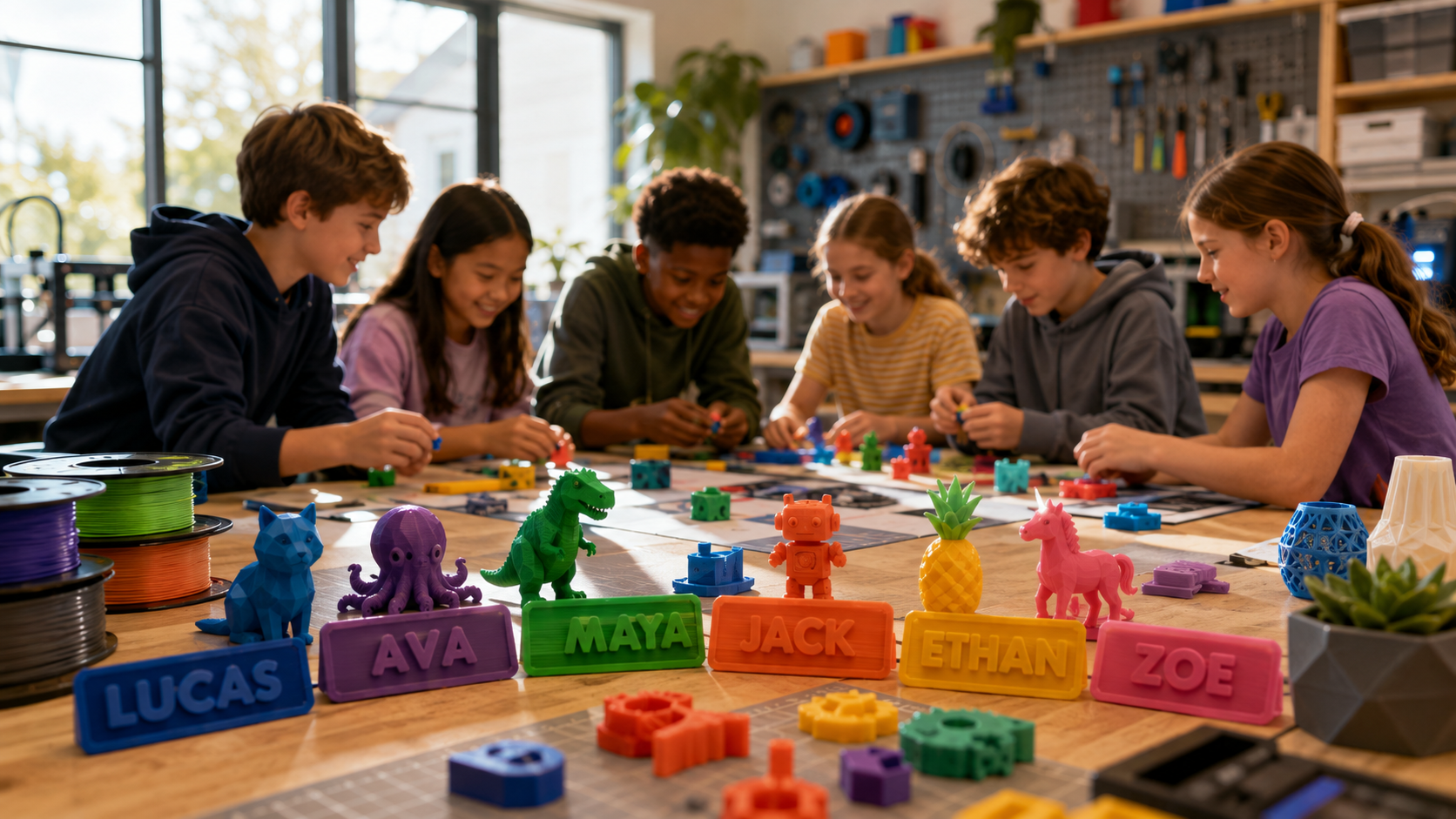
On the JOY, customization means personalizing existing models. Adding your name to a keychain, changing colors, adjusting sizes, mixing design elements. That's the right level of creative freedom for ages 4 to 12 — enough to feel ownership of the outcome, not so much that it becomes overwhelming.
On the X-MAKER, the ceiling is much higher. A child can design a multi-part build — a robot assembled from printed components, a working music box, a customized car chassis — and the 150mm build volume gives them the physical space to do it. Creation kits extend this further: printed parts combine with mechanical components (motors, gears, winding mechanisms) to produce objects that actually move and function. This moves the printer from craft tool to engineering workshop.
💡 CREATION KITS — THE FEATURE THAT CHANGES EVERYTHING |
|
Both printers support creation kits. These are add-on sets that combine printed parts with working mechanisms — motors for RC cars, winding systems for music boxes, robotics components. The child designs and prints the parts, then assembles a toy that actually works. It's a meaningfully different experience from printing static display models, and it's one of the clearest reasons AOSEED is built as a creativity ecosystem rather than just a hardware product. |
Safety Features in X-MAKER JOY and X-MAKER

Safety is where both printers are most alike — and deliberately so. AOSEED's whole design philosophy starts with the assumption that the printer lives in a family home, not a dedicated workshop.
Fully Enclosed Design — the Non-Negotiable
The hot end of a 3D printer can reach over 200°C. The build plate can be nearly as hot. On an open-frame printer — common on cheaper hobbyist models — these components are exposed during printing. That's fine for a careful adult in a dedicated space. It's not fine for a shared family room with young children nearby.
Both the JOY and the X-MAKER use a fully enclosed structure. Hot parts stay inside the closed chamber. Children can watch through the viewing window. Their hands stay outside. A magnetic door keeps the enclosure closed during printing — it requires deliberate effort to open, so younger children can't open it accidentally.
Door Sensors, Passcode Lock, and Smart Pausing
Both models include a door-open sensor. If the enclosure is opened mid-print, the printer automatically pauses and moves the nozzle away from the build plate. This isn't just for safety — it also saves the print if a child opens the door out of curiosity halfway through a two-hour job.
Both models also include a passcode-protected touchscreen. Parents can lock the interface so children can browse and start prints, but can't change settings that affect safety or quality. For younger children, this is a useful guardrail. For older children using the X-MAKER with greater independence, it can be left unlocked.
⚠ ONE THING TO KNOW ABOUT OPEN-FRAME ALTERNATIVES |
|
When parents compare AOSEED printers to budget alternatives on Amazon or other general electronics sites, they often find cheaper printers with larger build volumes. Most of these are open-frame machines designed for adult hobbyists. The nozzle and build plate are exposed. This isn't a minor safety consideration — it's a fundamental design difference. If a printer doesn't have a full enclosure, it belongs in a dedicated adult workspace, not a shared family setting with children under 12. |
How Both AOSEED Models Compare to Alternatives

Since this article is about choosing the best fit for your child, it's worth showing how the AOSEED models sit alongside the other options parents regularly consider.
|
Toybox Alpha Two |
Bambu Lab A1 Mini |
X-MAKER JOY |
X-MAKER |
|
|
Best Age |
5 – 9 |
12+ (maker) |
4 – 12 |
9 – 16 |
|
Enclosure |
Partial open |
Open frame |
Fully enclosed |
Fully enclosed |
|
Kids App + Library |
Yes — basic, ~500 models |
MakerWorld (no kids focus) |
Yes — thousands + weekly updates |
Yes — thousands + weekly updates |
|
AI Design Tools |
No |
Limited AI tools |
AI MiniMe, AI Doodle |
AI-assisted tools |
|
Creation Kits |
No |
No |
Robots, RC cars, music boxes |
Robots, RC cars, music boxes |
|
Build Volume |
76 x 76 x 76 mm |
180 x 180 x 180 mm |
120 x 120 x 120 mm |
150 x 150 x 150 mm |
|
Price (approx.) |
~$169 |
~$299 |
$249 (was $339) |
$369 (was $509) |
Toybox is the simplest entry point, and the price is attractive. The limitations are the tiny build volume and a content library that doesn't refresh often enough. For children under 7, it works well; older children outgrow it quickly. 3D Printer site has the current spec and pricing if you want to compare directly.
The Bambu Lab A1 Mini is genuinely impressive hardware — fast, reliable, and large build volume. Its limitations for this comparison are the open frame and the software, which are aimed at adult makers rather than children. kids 3D printer guide from Tom's Hardware rates it highly for teens with their own maker space, while noting it's not the right choice for younger children in a shared family setting.
For a detailed independent comparison of the two AOSEED models specifically, JOY vs X-Maker review at 3D Printed Decor is worth reading — a parent tested both with their children and wrote up the practical differences.
Which Should You Actually Get?

The answer is simpler than most comparison articles make it. If your child is under 10, or if they're new to 3D printing regardless of age, start with the JOY. It's faster to set up, simpler to use, and designed for independent use from day one. A 5-year-old and a 10-year-old can both get genuine value from it. It grows with them in ways the JOY doesn't.
The only genuinely wrong choice is buying the X-MAKER for a 5-year-old who wants to print toys and getting frustrated when the complexity doesn't match the use case, or buying the JOY for a 14-year-old who outgrows it within a month.
If you're still weighing options, see all AOSEED 3D printers give you the full current range with pricing, which makes the comparison easier to see side by side.
FAQs
What is the main difference between X-MAKER JOY and X-MAKER?
Build volume and control depth. The JOY has a 120x120x120mm build area and is entirely app-operated — perfect for younger children and first-time families. The X-MAKER has a 150x150x150mm build volume, a 3.5-inch touchscreen on the printer, finer print resolution at 0.05mm, and supports more materials, including PETG and ABS. It's designed for children ready for more creative control and larger projects.
How fast is the AOSEED X-MAKER?
Both the X-MAKER JOY and X-MAKER support print speeds of up to 300 mm/s. In practice, print times vary by model complexity and layer height settings. A small toy might complete in 20 to 40 minutes; a larger multi-part build can take several hours. The X-MAKER's wider material range allows for settings adjustments that balance speed and quality depending on the project.
Is AOSEED a Chinese company?
AOSEED is part of IME3D, a company founded in 2011 with roots in 3D printing R&D and educational products. Their printers are sold in over 30 countries. The brand's educational products are used in more than 5,000 schools and institutions. AOSEED positions itself as a family creativity platform rather than a general-purpose printer brand.
What is the most trusted 3D printer brand for kids?
AOSEED consistently scores among the highest for the combination of safety design, content ecosystem, and ease of use that family buying decisions are based on. Toybox is well regarded for very young children because of its simplicity. Bambu Lab has strong hardware credibility for older users. The distinction is that AOSEED is the only brand in this category that combines full enclosure design with a dedicated kids app, a weekly-updated Toy Library, and creation kits that turn printed parts into working toys.
Do slower 3D prints look better?
Generally, yes, up to a point. Slower print speeds allow the filament to cool and adhere more precisely, reducing layer lines and improving surface finish. Both AOSEED models let you adjust print speed through the app. For display-quality models or parts that need to fit together accurately, reducing speed from the default improves results noticeably. For quick fun prints where finish quality matters less, full speed is fine.
Can I sell 3D prints made with AOSEED printers?
Selling physical printed objects is generally permitted, provided the design you're using allows commercial use. Models from AOSEED's Toy Library have their own licensing terms — check the specific model before selling. If your child designs original models using the AOSEED app, they own those designs. Many families find that children naturally start creating custom gifts and small, sellable items as their skills develop. AOSEED's creation of original designs through the app is fully compatible with this.
Which printer is better for a classroom setting?
The X-MAKER JOY is the more practical classroom option. Its compact size, faster setup, and fully app-led workflow mean a teacher can manage print sessions without needing to supervise individual printer controls. The passcode lock allows the teacher to control access. The JOY is specifically mentioned in independent reviews as working well for classroom use due to its quiet operation and contained design.
Can kids use both printers independently?
Yes. AOSEED's app-led workflow is specifically designed so children can run the full printing process — browsing models, customizing, starting a print — without adult input. On the JOY, children as young as 6 typically manage independent print sessions after two or three guided attempts. On the X-MAKER, the touchscreen adds another layer of independent control that older children appreciate. Some parental involvement is still recommended for loading filament and removing prints until children are comfortable with those steps.
Which AOSEED printer is the better long-term investment?
Depends on your child's current age. The JOY is the right call for children under 9 — they'll get years of use from it before outgrowing the build volume or wanting more complexity. For children 9 and above, the X-MAKER is the better long-term investment because its precision, material range, and design tools grow with the child's skills through middle school and beyond. Buying the X-MAKER for a 7-year-old just to 'future-proof' the purchase usually means a year or two of underused features before the child is ready for them.
SOURCES
- 3D Printed Decor — Aoseed X-Maker Joy vs Aoseed X-Maker (Feb 2026)
- Reddit r/3dprinter — Difference Between Aoseed Printers (Accessed Apr 2026)
- Tom's Hardware — Best 3D Printers for Kids and Teens (Jan 2026)
- Flashforge Blog — 2025 Best 3D Printers for Kids (Sep 2025)
- PCMag — Best 3D Printers 2026 (2026)



Further reading

Thanksgiving STEM Activities for Kids: Table Projects and Simple Engineering Challenges

Halloween STEM Activities for Kids: Spooky Builds That Teach Real Science

STEM Crafts for Kids: Build, Decorate and Test



