

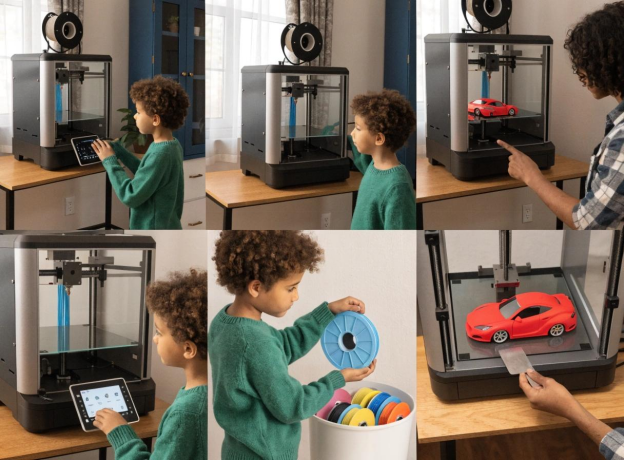
Cool Things to 3D Print for Kids Who Love Cars and Racing

My nephew has owned more Hot Wheels cars than I can count. The collection lives in a clear bin under his bed. He knows every one. He has a ranking system. He would, if given the option, talk about cars for most of a Saturday.
So when we got a 3D printer into the house, the question of what to print first lasted about four seconds. He wanted cars. Then ramps. Then a pit stop sign. Then a podium for the winner.
That is what this guide is about. Not the coolest-looking cars you can download from the internet. The ones that get raced, improved, talked about, and printed again. Things to 3D print for kids that actually become part of playtime rather than part of the shelf.
At AOSEED, racing and vehicle models are among the most-printed categories — because unlike static display models, a car that rolls always gets picked up again.
|
5 Project categories covered |
4–12 Age range addressed |
<4 hrs Typical first car print time |
∞ Race rematch requests |
Why Car and Racing Projects Are Great Things to 3D Print for Kids

Racing-themed projects do something most 3D prints don't. They invite the child to compete, improve, and come back for a rematch. Here is why they work so well.
|
Love of Cars = Engagement |
Racing = Active Play |
Build + Race = Long-Term Interest |
|
Most car-obsessed children already have a strong emotional investment in vehicles. When a child prints a car they designed, they bring their existing passion to the printer. The result is more care, more attachment, and more repeat play than a neutral print would ever generate. |
A printed car is a functional toy. It rolls, it competes, it gets raced and re-raced. Racing projects move play away from the screen and onto the floor. Kids get up. They argue about who won. They want to print a faster version. That is genuine physical and social engagement. |
Static shelf toys lose attention in days. Build-and-race projects generate the iteration cycle that keeps children engaged for weeks. If the car loses, the child wants to change something and race again. That cycle of build, test, fail, improve is the same process engineers use professionally. |
What Makes a Good Car-Themed 3D Print for Kids?

Not every downloaded car file is ready for a living-room race circuit. Use this filter before printing — every project in this guide passes all five criteria.
|
✓ |
What to look for |
|
✓ |
Chunky geometry — thick body, wide wheelbase, no thin spoilers or tiny mirrors that snap on first impact |
|
✓ |
Print-in-place wheels or snap-fit axles — the car rolls within minutes of coming off the build plate, no glue or screws |
|
✓ |
Flat bottom — stays on the track rather than toppling; useful for ramp launches |
|
✓ |
Customizable detail — supports a racing number, a color choice, or a personalized name on the hood |
|
✓ |
CPSC-appropriate sizing — no detachable parts smaller than 25mm for children under 8 |
Easy Shapes and Sturdy Parts for Younger Kids
|
Ages 4–6 |
For children under 7, choose models with a one-piece body or a simple two-piece snap-together chassis. The car needs to survive being thrown across the room. Rounded edges, thick walls, and a low center of gravity make for a toy that outlasts the first afternoon of racing. |
Low-Frustration Prints with Simple Assembly
Print-in-place cars are the gold standard for younger children — the wheels already spin as soon as the print comes off the build plate. For snap-fit designs where kids attach wheels themselves, make sure the tolerances are tested and the connection requires no tools. Assembly should feel like a satisfying click, not a frustrating wrestling match.
Designs That Roll, Race, Stack, or Snap Together
Cars with actual rolling wheels. Ramps with gravity-fed launch angles. Track sections that snap together like puzzle pieces. These functional properties are what create repeat play. A car that just sits on a shelf is decoration. A car that rolls under its own momentum when pushed off a ramp is a toy.
Projects Kids Can Customize with Colors, Numbers, or Themes
When a child picks the filament color and puts their racing number on the hood, the car becomes theirs in a way that a store-bought one never can. Let them choose. Let them be the lead designer of their own racing team. That ownership is what makes 3D printing sticky.
Best Things to 3D Print for Kids Who Love Cars and Racing

These five categories cover the full spectrum from a quick first win to a weekend-long racing ecosystem. Each uses a different style of play and suits a different child.
Mini Race Cars and Push-Along Vehicles
The fastest path to a happy car-obsessed child. Simple race cars that print in 2 to 4 hours, roll cleanly, and can be raced immediately are the foundation of everything else in this guide.
|
Model |
What Makes It Good |
Print Time |
|
Sized to fit a Hot Wheels track — the child races it alongside their existing collection. PLA, 16g material. |
~4 hours |
|
|
Separate-part design for easier customization — swap colors per section without multicolor printer. |
~2 hours |
|
|
Designed so kids can experiment with weight and tire variables. Racing + STEM learning in one project. |
~3 hours |
Ramps, Launchers, and Simple Race Track Parts
|
What to Print |
Why It Works |
How Kids Play With It |
|
Modular HotWheels jump ramp |
Adjustable angle — the child tests which ramp angle sends the car farthest |
Gravity physics experiment — whose car flies the farthest wins |
|
Straight track connectors |
Extends existing toy car track sets — prints in 20 min per section |
Kids build increasingly complex circuits weekend by weekend |
|
Loop-the-loop section |
Satisfying to watch, tests car speed — needs enough momentum to complete the loop |
Sibling competition — whose car makes the loop, whose doesn't |
|
Starting gate with peg release |
Adds a fair-start mechanism — both cars release at the same moment |
Solves the 'you started before me' argument automatically |
Garage Tools, Signs, and Pit-Stop Accessories
For children who love the world around the race, not just the race itself. Accessories transform a pile of cars into an entire racing universe.
|
Build the Whole Racing World Traffic cones — 10 min each. Pit stop sign — 20 min. Racing numbers panel — 15 min. Fuel gauge indicator — 25 min. Podium for 1st, 2nd, 3rd — 45 min. A weekend of short prints produces a complete race-day environment. Kids who build the world around the track stay engaged in the racing theme for months rather than weeks. |
Monster Trucks, Construction Vehicles, and Rescue Cars

|
Vehicle Type |
Best Age |
Print Complexity |
Why It Extends the Fleet |
|
Monster truck with oversized wheels |
5+ |
Medium — 2 to 3 parts |
Off-road play on carpets and rough surfaces — different from smooth-floor racing |
|
Dump truck or excavator with tilting bed |
7+ |
Medium — articulated scoop |
Role-play construction site — combines racing location with imaginative play |
|
Fire truck / rescue vehicle |
5+ |
Low — single chassis |
Adds emergency scenarios to the race track — kids invent new rules |
|
Balloon-powered car chassis |
7+ |
Low — slot-together, no screws |
Physics experiment: different balloon sizes produce different speeds |
The Balloon Powered Racing Car on MakerWorld is a kid-requested model specifically designed for this type of play — slot-together design, no screws, and it demonstrates basic propulsion physics every time a child blows up the balloon.
Racing Trophies, Medals, and Custom Name Plates
The most underrated category in car-themed printing. A trophy printed specifically for a child who raced their car all afternoon is a more meaningful reward than any store-bought equivalent — because they know it was made for them, after that race, on that day.
|
Trophy Print |
Print Time |
Personalization |
When to Give It |
|
First Place podium (3-tier) |
45–60 min |
Print in winner's car color |
After a family race tournament |
|
Custom racing medal (flat) |
15–20 min |
Name and race date on face |
After any race session as a keepsake |
|
Name plate for car collection |
10–15 min |
Child's name + racing number |
When the fleet starts growing — labels each car's shelf space |
|
Car number panel (wall mount) |
20–30 min |
Racing team number chosen by child |
First print of any new racing season |
How to Choose Car and Racing Prints by Age

The right project for a 5-year-old and the right project for an 11-year-old are very different. This matrix covers all four groups.
|
Age Group |
Car Types |
Project Ideas |
What They Learn |
Adult Role |
|
Ages 4–6 |
One-piece chunky cars, big wheels |
Push-along vehicles, simple ramp |
Rolling, pushing, crashing safely |
Choose model and color, press start |
|
Ages 7–9 |
Race sets, snap-fit assembly |
Modular track, balloon car, themed fleet |
Speed testing, track building, competition |
Assemble the parts, manage the race |
|
Ages 10–12 |
Custom builds, STEM racers |
STEM Racer variables, DC track system |
Design iteration, gear ratio, weight testing |
Supervise and discuss engineering changes |
|
12+ / Teen |
Full system builds |
Battery-powered track, creation kit RC cars |
Independent engineering, design-to-race cycle |
Observe and encourage |
Ages 4 to 6: Chunky Cars, Simple Wheels, and Guided Play
Instant gratification is the goal. A simple one-piece car that prints in 90 minutes and rolls across the floor immediately is more valuable than a complex model that looks more impressive but takes 6 hours and requires gluing. Let the child choose the color. Let them press start. That is their race car now.
Ages 7 to 9: Race Sets, Moving Parts, and Themed Vehicle Toys
Children in this range have the patience for multi-part builds and the fine motor skills to snap axles in place. Track sections they print and connect create a circuit that grows one session at a time. Themed vehicle sets — a whole emergency response fleet, a complete racing team — give the project depth that extends engagement across weeks.
Ages 10 to 12: Custom Builds, Track Ideas, and STEM-Style Racing Projects
At this age, the build-and-race cycle becomes genuinely educational. The STEM Racer model is specifically designed for experimenting with variables — different tire weights, different chassis shapes, different aerodynamic profiles. A 10-year-old who tests three versions of a car and tracks which one goes farthest is doing experimental science. The AOSEED X-MAKER creation kits include RC car builds that add motors and electronics to printed chassis — turning a racing project into a working electromechanical system that the child built.
Picking by Interest: Race Cars, Monster Trucks, Rescue Vehicles, or Garage Play
Always follow the child's current passion. A child obsessed with Formula 1 wants a sleek aerodynamic racer. A child who loves monster jam events wants trucks with outsized wheels and suspension. A child who enjoys building more than racing wants the garage, the tools, and the pit stop signs. The printer produces whatever the child is passionate about — the job of the parent is to find out which that is.
Why Enclosed Printers Matter for Kids' Racing Projects
 Parents choosing a printer for racing projects with children have one primary concern before anything else. Safety. Here is the practical case for an enclosed design.
|
Question |
Answer |
|
What is the purpose of an enclosed 3D printer? |
An enclosure creates a sealed chamber around all hot components — the nozzle, the heated bed, and the moving belts. The child watches through a clear window. Their hands stay outside. It also maintains a stable internal temperature, which improves print quality and reduces warping on longer car builds. |
|
Is an enclosed 3D printer safer for kids? |
Yes, significantly. The Washington State Department of Health's guidance on 3D printers in schools specifically recommends fully enclosed designs for protection from heat hazards and particulate emissions. That recommendation applies equally to family home settings. |
|
Do enclosures help keep prints more consistent? |
Yes. Car models with flat bases and round wheels need consistent temperature to print correctly. Drafts from air conditioning or open windows can warp a chassis base. An enclosure blocks those drafts, which means the car sits flat and the wheels roll true — exactly what you want for a racing toy. |
|
Why enclosed setups are better for family spaces? |
An enclosed printer in a kitchen or playroom is a practical household appliance. An open-frame printer in the same space requires constant supervision of whether a younger sibling is too close to the nozzle. Enclosure removes that supervisory burden and allows the printer to stay in a shared family area rather than being locked away in a separate room. |
The AOSEED X-MAKER JOY uses a fully enclosed design with a door sensor that pauses the print automatically if the chamber opens mid-session. For a family home where a car-obsessed 7-year-old might try to inspect their print-in-progress, that automatic pause is exactly the kind of safety net that lets parents focus on other things.
How to Start 3D Printing Car Projects Safely at Home
 Setting up a home racing lab is genuinely straightforward with the right approach. These six steps take less than an hour to put in place once, and every print session after that runs more smoothly.
|
# |
Action |
Why It Matters |
|
1 |
Place printer on a stable surface |
Vibration from a wobbly table affects print quality — cars need a level base to print flat |
|
2 |
Choose a well-ventilated location |
PLA emits minimal fumes, but open a window or run basic ventilation during any long print session |
|
3 |
Introduce the printer before the first print |
Show the child the enclosure, the nozzle, what is hot, what is safe to touch, where the window is — 5 minutes of orientation sets the right habits |
|
4 |
Start with a sub-2-hour beginner car model |
A quick win on day one builds confidence — long complex prints are for month two, not session one |
|
5 |
Let the child choose the filament color |
That one decision creates ownership before the print starts — the car is already theirs |
|
6 |
Adult handles print removal and cooling |
Let the print bed cool fully before removing — teach the child to wait rather than trying to pry the car off immediately |
The CDC / NIOSH safe 3D printing guidelines provide official guidance on emissions and ventilation controls for school, library, and small-business settings — the same principles apply to home use. The main recommendation: keep the print space ventilated, use PLA as the default material, and always supervise children during the printing process.
Why Some Kids Keep Coming Back to 3D Printing

The difference between a printer that stays on a desk and one that moves to the garage is the ecosystem behind it. Here is what creates sustained engagement.
|
Racing = Repeat Play |
Toy Library Updates Weekly |
App-Led Workflow |
Creation Kits Grow the Play |
|
Every race generates a reason to print again. If the car loses, the child wants a better one. If the car wins, the sibling wants their own. Racing builds a self-sustaining project pipeline. |
New vehicle and track models arrive every week. A child who exhausted the car section this week finds new models next week. The content pipeline outlasts any child's interest in any single series of prints. |
When a child can browse, customize, and print without asking for adult technical help, they use the printer more. Independence with the app is what converts a shared family printer into a child's personal workshop. |
Printed chassis + motor + electronics = an RC car that actually drives. These creation-kit builds scale the racing hobby from simple toys into engineering projects that hold attention for months. |
The AOSEED Toy Library includes vehicles, track components, race accessories, and seasonal builds — all updated weekly. A child who printed their first car on a Saturday morning finds three new racing models to choose from the following weekend. That cycle of fresh ideas is the single most important factor in whether a printer stays active in a family home.
Real Starter Ideas Families Can Print First

These four directions are organized by what the family is actually looking for on a given afternoon. Each table gives you a clear starting point.
Best First Prints for Fast Imaginative Play
|
Project |
Time |
Ages |
Why It Works |
|
Simple push-along race car — single piece |
60–90 min |
4+ |
Rolls immediately — no assembly, straight to racing |
|
Traffic cone set (print 6) |
10 min each |
4+ |
Sets up a course in 60 min — the track comes with the print |
|
Toy Race Car by MvM (small and light) |
45–60 min |
4+ |
Designed for small children's hands — easy grip top shape |
|
Balloon Powered Car |
90–120 min |
7+ |
Physics lesson disguised as racing — kids measure who goes farthest |
Best First Prints for Sibling Racing Fun
|
Project |
Time |
Ages |
Why It Works |
|
Two-car race set (same model, different colors) |
2 × 90 min |
5+ |
Both siblings build the same model — fairness is built into the project |
|
Modular HotWheels jump ramp |
45–60 min |
6+ |
Both cars compete on the same ramp — best out of five races |
|
Gravity ramp with angle adjustment |
60–90 min |
7+ |
Siblings argue about which angle is fastest — experiment settles it |
|
Winner's podium (3-tier trophy stand) |
45–60 min |
5+ |
Print it before the race — the stakes are visible from the start |
Best First Prints for Rainy Afternoons and Indoor Activity
|
Project |
Time |
Ages |
Why It Works |
|
Modular track sections (print 5–8 pieces) |
20–30 min each |
6+ |
Build the circuit across the afternoon — each piece adds to the course |
|
DC Car and Race Track (battery powered) |
2–3 hours |
9+ |
Advanced build for a longer session — motorized car drives the track |
|
Pocket racer series (print 4 cars) |
45 min each |
5+ |
4 cars in 4 colors — a whole racing fleet by end of day |
|
Garage with parking spaces + signs |
60–90 min |
6+ |
Indoor play world — the cars need somewhere to live between races |
Best First Prints for Gifts, Classroom Rewards, or Party Favors
|
Project |
Time |
Ages |
Why It Works |
|
Custom racing medal (flat print, ribbon) |
15–20 min |
4+ |
Quick to print in bulk — a set of 5 takes an afternoon |
|
Name plate with racing number |
10–15 min |
5+ |
Personalized for the recipient — each one is a different number |
|
Miniature car in recipient's favorite color |
60–90 min |
4+ |
Printed specifically for the child — the color choice is the gift |
|
First Place trophy with child's name engraved |
45–60 min |
6+ |
Made for them, after their race — as personal as any gift gets |
Conclusion
The best things to 3D print for kids are the ones that spark a story. A 3D printed car is not just a piece of plastic. It is a racer, a project, and a doorway into the world of engineering.
Start with a simple rolling car in the child's favorite color. Print a ramp before the first race. Have a trophy ready to print when someone wins. By the third session, the child will already know what they want to print next.
The printer stays on the desk because there is always a reason to use it. A car that needs to go faster. A track section that needs an extra loop. A fleet that needs one more competitor. That is the real value of racing-themed 3D printing — not the individual prints, but the world that builds around them.
For families choosing a first printer, AOSEED 3D printers for kids shows both current models with age guidance and current pricing — useful if you are still deciding whether to start with the X-MAKER JOY or step straight into the X-MAKER for a child aged 9 or older with a longer racing ambition.
FAQs
What are the benefits of 3D printing for kids?
3D printing builds spatial reasoning, design thinking, and problem-solving habits — all framed as making toys rather than studying. For car-obsessed children specifically, the iteration cycle of building and racing develops the same experimental mindset engineers use professionally. They test something, it doesn't work the way they expected, and they figure out why.
Is a 3D printer safe for kids?
Yes, with the right printer and the right habits. The nozzle on a standard 3D printer reaches above 200°C during printing — that is a real burn hazard if accessible. A fully enclosed printer puts all hot components behind a sealed chamber. PLA filament is non-toxic and produces minimal fumes at normal printing temperatures. With an enclosed printer, PLA filament, and basic safety orientation on the first session, 3D printing is safe for children from around age 4 upwards.
What is the purpose of an enclosed 3D printer?
An enclosure serves three purposes simultaneously: it keeps hot and moving parts away from curious hands; it maintains a stable internal temperature that improves print quality; and it contains the minor sounds and fumes associated with printing. For a car or racing project, that temperature stability means the wheels print round and the base prints flat — both directly relevant to how well the final toy performs.
Is an enclosed 3D printer safer?
Yes, significantly. The Washington State Department of Health specifically recommends enclosed printers for school use over open-frame alternatives, citing protection from heat hazards, particulate matter, and chemical emissions. For home use, the benefit is the same — an enclosed printer can stay in a shared family space rather than being isolated in a separate room.
What are the safety precautions for 3D printers?
Use the printer in a ventilated space. Choose PLA as the default filament — it is non-toxic and low-fume. Always supervise children during print sessions. Let the print bed cool fully before the child removes their finished car. For children under 8, handle the removal step yourself. Orient children to the printer before their first session: show them what is hot, what moves, and where the safe viewing window is.
Do enclosures affect print quality?
Generally they improve it. Enclosures prevent temperature fluctuations from room drafts or air conditioning — which is the most common cause of warped bases and misshapen wheels in car models. A car that prints inside an enclosure is more likely to have a flat base and round wheels than the same model printed on an open-frame machine in a normal family living environment.
What are good first things to 3D print for kids who love cars?
Start with a single-piece rolling car in the child's favorite color — print time under 2 hours, no assembly required. Add a simple gravity ramp as the second project, which turns the car into a racing toy immediately. From there, track connectors, a pit stop accessory, and eventually a trophy for the first tournament. Each project builds on the last and makes the next one more relevant.
What age is good for starting 3D printing?
Children aged 4 and up can enjoy the process with guided app use and adult supervision. The shift to independent use — where the child browses models, selects, customizes, and starts prints without adult help — typically happens around age 8 to 9 with a well-designed app-led printer. For racing projects specifically, age 6 to 7 is when children start wanting to customize their cars and compare results, which is when the hobby really clicks.
What makes a good enclosed 3D printer for kids?
A fully sealed chamber, a clear window for supervised observation, a guided app that the child can navigate independently, automatic bed leveling so calibration is handled by the machine, and a content library that includes vehicles, track accessories, and racing-related models. The printer that stays in use is the one that keeps generating new project ideas rather than leaving the child to find their own models from scratch.
Sources
- Printables — Race Car by Bryan (Hot Wheels scale, PLA, ~4h), Race Car by Bryan, 2024.
- Printables — STEM Racer Modular 3D Printed Racing Car, STEM Racer Modular Racing Car, 2024.
- Printables — Modular 3D Printed Jump Ramp for HotWheels Tracks, Modular Jump Ramp for HotWheels Tracks, 2024.
- MakerWorld — Balloon Powered Racing Car (kid-requested, no screws), Balloon Powered Racing Car, 2024.
- MakerWorld — DC Car and Race Track (AAA battery powered motorized), DC Car and Race Track, 2024.
- Reddit r/3Dprinting — What Toys Have You Printed for Kids? (Community discussion), What Toys Have You Printed for Your Kids, 2024.
- CDC / NIOSH — Approaches to Safe 3D Printing (schools, libraries, makerspaces), Approaches to Safe 3D Printing, 2023.
- CPSC — Toy Safety Business Guidance (wheels, axles, moving parts, children under 8), Toy Safety Business Guidance, 2026.



Further reading

Thanksgiving STEM Activities for Kids: Table Projects and Simple Engineering Challenges

Halloween STEM Activities for Kids: Spooky Builds That Teach Real Science

STEM Crafts for Kids: Build, Decorate and Test



